> ## Documentation Index
> Fetch the complete documentation index at: https://ultrarag.openbmb.cn/llms.txt
> Use this file to discover all available pages before exploring further.
# AgentCPM-Report
AgentCPM-Report 是一款由 [THUNLP](https://nlp.csai.tsinghua.edu.cn)、中国人民大学 [RUCBM](https://github.com/RUCBM) 和 [ModelBest](https://modelbest.cn/en) 联合研发的开源大语言模型智能体。
该模型基于 [MiniCPM4.1](https://github.com/OpenBMB/MiniCPM)(80亿参数)基座构建,能够接受用户指令,自主进行深度调研并生成长篇报告。
核心亮点:
* **卓越的洞察力与全面性**:作为一款 8B 参数量的端侧模型,AgentCPM-Report 在深度调研报告生成任务上展现了惊人的潜力,其表现已赶超部分闭源商用智能体系统。它重新定义了小规模智能体的性能天花板,尤其在洞察力 (Insight) 指标上取得了 SOTA 结果。
* **轻量化与本地化部署**:模型支持在个人计算机上进行敏捷部署。通过结合 UltraRAG 等框架,用户可以构建规模化的本地知识库,生成比通用大模型更专业、更深入的报告。这种轻量级与本地化的特性,为处理隐私数据或私域数据的深度报告写作提供了安全可靠的基础。
本文档旨在介绍如何在 UltraRAG 框架中配置和使用 AgentCPM-Report。
为了获得最佳生成效果,我们强烈推荐下载并使用配套的专有模型 [AgentCPM-Report](https://huggingface.co/openbmb/AgentCPM-Report)。
## 1. Pipeline 结构概览
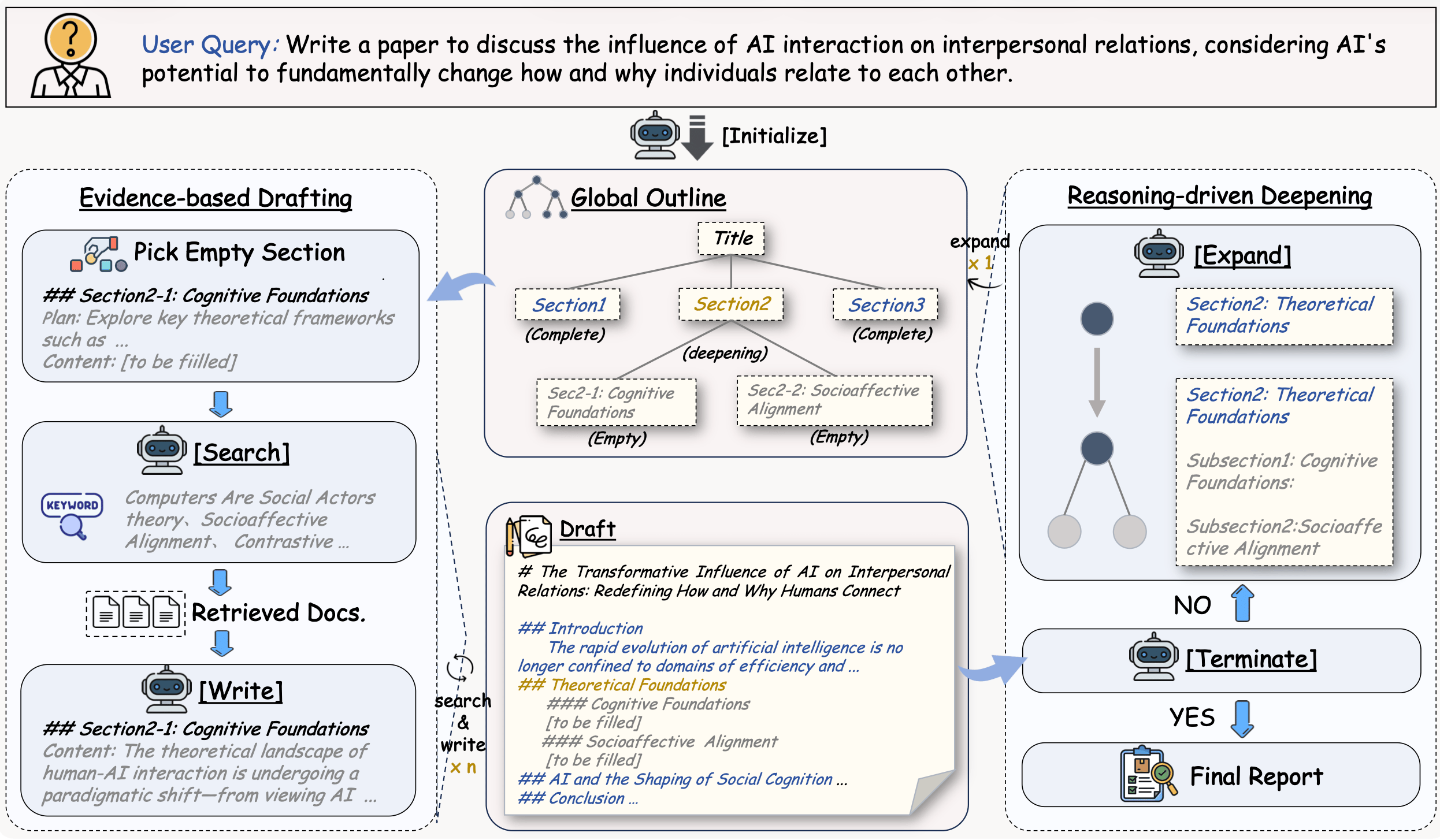
AgentCPM-Report Pipeline 采用基于状态机(State Machine)的动态循环架构,系统在初始化后进入核心循环,由智能路由(Router)根据当前任务进展自主决策下一步行动——在信息搜集(Search)、初始规划(Analyst-Init)、内容撰写(Write)和计划扩展(Analyst-Extend)四个分支间灵活切换,通过不断的“检索-规划-写作”迭代,直至完成所有调研任务并输出最终的格式化报告。
 ```yaml examples/AgentCPM-Report.yaml icon="https://mintcdn.com/ultrarag/T7GffHzZitf6TThi/images/yaml.svg?fit=max&auto=format&n=T7GffHzZitf6TThi&q=85&s=69b41e79144bc908039c2ee3abbb1c3b" theme={null}
# AgentCPM-Report Demo for UltraRAG UI
# MCP Server
servers:
benchmark: servers/benchmark
generation: servers/generation
retriever: servers/retriever
prompt: servers/prompt
router: servers/router
custom: servers/custom
# MCP Client Pipeline
pipeline:
- benchmark.get_data:
output:
q_ls: instruction_ls
- retriever.retriever_init
- generation.generation_init
- custom.surveycpm_init_citation_registry
- custom.surveycpm_state_init
- loop:
times: 140
steps:
- branch:
router:
- router.surveycpm_state_router
branches:
search:
- prompt.surveycpm_search:
output:
prompt_ls: search_prompt_ls
- generation.generate:
input:
prompt_ls: search_prompt_ls
output:
ans_ls: search_response_ls
- custom.surveycpm_parse_search_response:
input:
response_ls: search_response_ls
- retriever.retriever_batch_search:
input:
batch_query_list: keywords_ls
- custom.surveycpm_process_passages_with_citation
- custom.surveycpm_update_state
analyst-init_plan:
- prompt.surveycpm_init_plan:
output:
prompt_ls: init_plan_prompt_ls
- generation.generate:
input:
prompt_ls: init_plan_prompt_ls
output:
ans_ls: init_plan_response_ls
- custom.surveycpm_after_init_plan:
input:
response_ls: init_plan_response_ls
- custom.surveycpm_update_state
write:
- prompt.surveycpm_write:
output:
prompt_ls: write_prompt_ls
- generation.generate:
input:
prompt_ls: write_prompt_ls
output:
ans_ls: write_response_ls
- custom.surveycpm_after_write:
input:
response_ls: write_response_ls
- custom.surveycpm_update_state
analyst-extend_plan:
- prompt.surveycpm_extend_plan:
output:
prompt_ls: extend_prompt_ls
- generation.generate:
input:
prompt_ls: extend_prompt_ls
output:
ans_ls: extend_response_ls
- custom.surveycpm_after_extend:
input:
response_ls: extend_response_ls
- custom.surveycpm_update_state
done: []
- custom.surveycpm_format_output:
output:
ans_ls: final_survey_ls
```
## 2. 编译Pipeline文件
执行以下命令编译该工作流:
```shell theme={null}
ultrarag build examples/AgentCPM-Report.yaml
```
## 3. 配置运行参数
修改 `examples/parameter/AgentCPM-Report_parameter.yaml`。
想要调整调研深度? 请在 `custom` 配置中按需调整:增加 `surveycpm_max_step` 以延长研究时间,提高 `surveycpm_max_extend_step` 以获得更详实的扩写内容。若对质量有极高要求,请务必开启 `surveycpm_hard_mode`(硬核模式)。
```yaml examples/parameter/AgentCPM-Report_parameter.yaml icon="https://mintcdn.com/ultrarag/T7GffHzZitf6TThi/images/yaml.svg?fit=max&auto=format&n=T7GffHzZitf6TThi&q=85&s=69b41e79144bc908039c2ee3abbb1c3b" theme={null}
benchmark:
benchmark:
key_map:
gt_ls: golden_answers
q_ls: question
limit: -1
name: nq
path: data/sample_nq_10.jsonl
seed: 42
shuffle: false
custom:
surveycpm_hard_mode: false # [!code --]
surveycpm_hard_mode: true # [!code ++]
surveycpm_max_extend_step: 12
surveycpm_max_step: 140
generation:
backend: vllm # [!code --]
backend: openai # [!code ++]
backend_configs:
hf:
batch_size: 8
gpu_ids: 2,3
model_name_or_path: openbmb/AgentCPM-Report
trust_remote_code: true
openai:
api_key: abc
base_delay: 1.0
base_url: http://localhost:8000/v1 # [!code --]
base_url: http://localhost:65506/v1 # [!code ++]
concurrency: 8
model_name: MiniCPM4-8B # [!code --]
model_name: AgentCPM-Report # [!code ++]
retries: 3
vllm:
dtype: auto
gpu_ids: 2,3
gpu_memory_utilization: 0.9
model_name_or_path: openbmb/AgentCPM-Report
trust_remote_code: true
extra_params:
chat_template_kwargs:
enable_thinking: false
sampling_params:
max_tokens: 2048
temperature: 0.7
top_p: 0.8
system_prompt: '' # [!code --]
system_prompt: '你是一个专业的UltraRAG问答助手。请一定记住使用中文回答问题。' # [!code ++]
prompt:
surveycpm_extend_plan_template: prompt/surveycpm_extend_plan.jinja
surveycpm_init_plan_template: prompt/surveycpm_init_plan.jinja
surveycpm_search_template: prompt/surveycpm_search.jinja
surveycpm_write_template: prompt/surveycpm_write.jinja
retriever:
backend: sentence_transformers # [!code --]
backend: openai # [!code ++]
backend_configs:
bm25:
lang: en
save_path: index/bm25
infinity:
bettertransformer: false
model_warmup: false
pooling_method: auto
trust_remote_code: true
openai:
api_key: abc
base_url: https://api.openai.com/v1 # [!code --]
base_url: http://localhost:65504/v1 # [!code ++]
model_name: text-embedding-3-small # [!code --]
model_name: qwen-embedding # [!code ++]
sentence_transformers:
sentence_transformers_encode:
encode_chunk_size: 256
normalize_embeddings: false
psg_prompt_name: document
psg_task: null
q_prompt_name: query
q_task: null
trust_remote_code: true
batch_size: 16
collection_name: wiki
corpus_path: data/corpus_example.jsonl
gpu_ids: '1'
index_backend: faiss
index_backend_configs:
faiss:
index_chunk_size: 10000
index_path: index/index.index
index_use_gpu: true
milvus:
id_field_name: id
id_max_length: 64
index_chunk_size: 1000
index_params:
index_type: AUTOINDEX
metric_type: IP
metric_type: IP
search_params:
metric_type: IP
params: {}
text_field_name: contents
text_max_length: 60000
token: null
uri: index/milvus_demo.db
vector_field_name: vector
is_demo: false
is_multimodal: false
model_name_or_path: openbmb/MiniCPM-Embedding-Light
query_instruction: '' # [!code --]
query_instruction: 'Query: ' # [!code ++]
top_k: 5 # [!code --]
top_k: 20 # [!code ++]
```
## 4. 效果演示
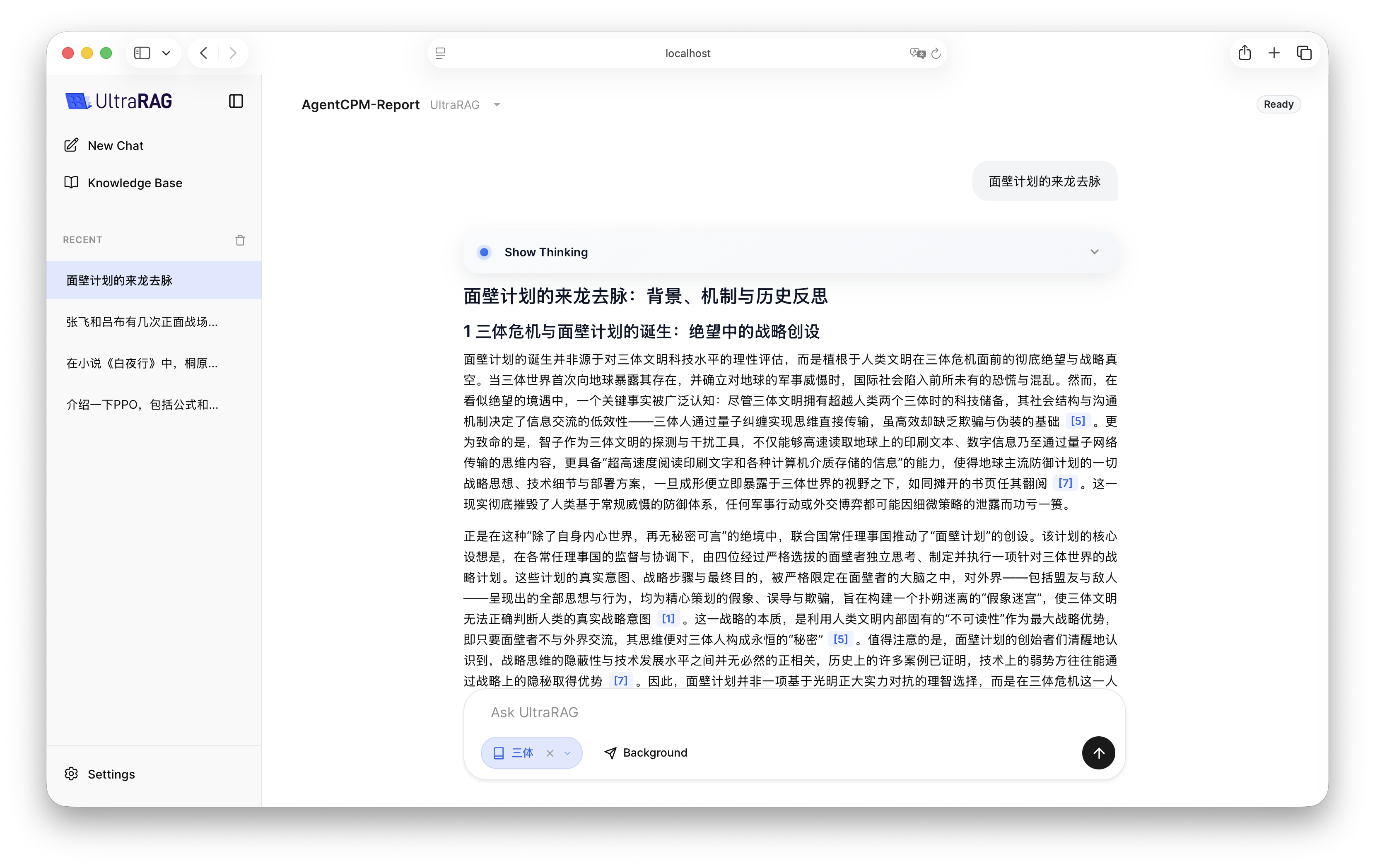
配置完成后,在 UltraRAG UI 中启动 AgentCPM-Report Pipeline。
由于万字综述的生成涉及大量并发检索与多轮推理,耗时通常在 10 分钟以上。您可以利用 UI 的[后台运行](/pages/cn/ui/start)功能,任务完成后再回来查看最终报告。
```yaml examples/AgentCPM-Report.yaml icon="https://mintcdn.com/ultrarag/T7GffHzZitf6TThi/images/yaml.svg?fit=max&auto=format&n=T7GffHzZitf6TThi&q=85&s=69b41e79144bc908039c2ee3abbb1c3b" theme={null}
# AgentCPM-Report Demo for UltraRAG UI
# MCP Server
servers:
benchmark: servers/benchmark
generation: servers/generation
retriever: servers/retriever
prompt: servers/prompt
router: servers/router
custom: servers/custom
# MCP Client Pipeline
pipeline:
- benchmark.get_data:
output:
q_ls: instruction_ls
- retriever.retriever_init
- generation.generation_init
- custom.surveycpm_init_citation_registry
- custom.surveycpm_state_init
- loop:
times: 140
steps:
- branch:
router:
- router.surveycpm_state_router
branches:
search:
- prompt.surveycpm_search:
output:
prompt_ls: search_prompt_ls
- generation.generate:
input:
prompt_ls: search_prompt_ls
output:
ans_ls: search_response_ls
- custom.surveycpm_parse_search_response:
input:
response_ls: search_response_ls
- retriever.retriever_batch_search:
input:
batch_query_list: keywords_ls
- custom.surveycpm_process_passages_with_citation
- custom.surveycpm_update_state
analyst-init_plan:
- prompt.surveycpm_init_plan:
output:
prompt_ls: init_plan_prompt_ls
- generation.generate:
input:
prompt_ls: init_plan_prompt_ls
output:
ans_ls: init_plan_response_ls
- custom.surveycpm_after_init_plan:
input:
response_ls: init_plan_response_ls
- custom.surveycpm_update_state
write:
- prompt.surveycpm_write:
output:
prompt_ls: write_prompt_ls
- generation.generate:
input:
prompt_ls: write_prompt_ls
output:
ans_ls: write_response_ls
- custom.surveycpm_after_write:
input:
response_ls: write_response_ls
- custom.surveycpm_update_state
analyst-extend_plan:
- prompt.surveycpm_extend_plan:
output:
prompt_ls: extend_prompt_ls
- generation.generate:
input:
prompt_ls: extend_prompt_ls
output:
ans_ls: extend_response_ls
- custom.surveycpm_after_extend:
input:
response_ls: extend_response_ls
- custom.surveycpm_update_state
done: []
- custom.surveycpm_format_output:
output:
ans_ls: final_survey_ls
```
## 2. 编译Pipeline文件
执行以下命令编译该工作流:
```shell theme={null}
ultrarag build examples/AgentCPM-Report.yaml
```
## 3. 配置运行参数
修改 `examples/parameter/AgentCPM-Report_parameter.yaml`。
想要调整调研深度? 请在 `custom` 配置中按需调整:增加 `surveycpm_max_step` 以延长研究时间,提高 `surveycpm_max_extend_step` 以获得更详实的扩写内容。若对质量有极高要求,请务必开启 `surveycpm_hard_mode`(硬核模式)。
```yaml examples/parameter/AgentCPM-Report_parameter.yaml icon="https://mintcdn.com/ultrarag/T7GffHzZitf6TThi/images/yaml.svg?fit=max&auto=format&n=T7GffHzZitf6TThi&q=85&s=69b41e79144bc908039c2ee3abbb1c3b" theme={null}
benchmark:
benchmark:
key_map:
gt_ls: golden_answers
q_ls: question
limit: -1
name: nq
path: data/sample_nq_10.jsonl
seed: 42
shuffle: false
custom:
surveycpm_hard_mode: false # [!code --]
surveycpm_hard_mode: true # [!code ++]
surveycpm_max_extend_step: 12
surveycpm_max_step: 140
generation:
backend: vllm # [!code --]
backend: openai # [!code ++]
backend_configs:
hf:
batch_size: 8
gpu_ids: 2,3
model_name_or_path: openbmb/AgentCPM-Report
trust_remote_code: true
openai:
api_key: abc
base_delay: 1.0
base_url: http://localhost:8000/v1 # [!code --]
base_url: http://localhost:65506/v1 # [!code ++]
concurrency: 8
model_name: MiniCPM4-8B # [!code --]
model_name: AgentCPM-Report # [!code ++]
retries: 3
vllm:
dtype: auto
gpu_ids: 2,3
gpu_memory_utilization: 0.9
model_name_or_path: openbmb/AgentCPM-Report
trust_remote_code: true
extra_params:
chat_template_kwargs:
enable_thinking: false
sampling_params:
max_tokens: 2048
temperature: 0.7
top_p: 0.8
system_prompt: '' # [!code --]
system_prompt: '你是一个专业的UltraRAG问答助手。请一定记住使用中文回答问题。' # [!code ++]
prompt:
surveycpm_extend_plan_template: prompt/surveycpm_extend_plan.jinja
surveycpm_init_plan_template: prompt/surveycpm_init_plan.jinja
surveycpm_search_template: prompt/surveycpm_search.jinja
surveycpm_write_template: prompt/surveycpm_write.jinja
retriever:
backend: sentence_transformers # [!code --]
backend: openai # [!code ++]
backend_configs:
bm25:
lang: en
save_path: index/bm25
infinity:
bettertransformer: false
model_warmup: false
pooling_method: auto
trust_remote_code: true
openai:
api_key: abc
base_url: https://api.openai.com/v1 # [!code --]
base_url: http://localhost:65504/v1 # [!code ++]
model_name: text-embedding-3-small # [!code --]
model_name: qwen-embedding # [!code ++]
sentence_transformers:
sentence_transformers_encode:
encode_chunk_size: 256
normalize_embeddings: false
psg_prompt_name: document
psg_task: null
q_prompt_name: query
q_task: null
trust_remote_code: true
batch_size: 16
collection_name: wiki
corpus_path: data/corpus_example.jsonl
gpu_ids: '1'
index_backend: faiss
index_backend_configs:
faiss:
index_chunk_size: 10000
index_path: index/index.index
index_use_gpu: true
milvus:
id_field_name: id
id_max_length: 64
index_chunk_size: 1000
index_params:
index_type: AUTOINDEX
metric_type: IP
metric_type: IP
search_params:
metric_type: IP
params: {}
text_field_name: contents
text_max_length: 60000
token: null
uri: index/milvus_demo.db
vector_field_name: vector
is_demo: false
is_multimodal: false
model_name_or_path: openbmb/MiniCPM-Embedding-Light
query_instruction: '' # [!code --]
query_instruction: 'Query: ' # [!code ++]
top_k: 5 # [!code --]
top_k: 20 # [!code ++]
```
## 4. 效果演示
配置完成后,在 UltraRAG UI 中启动 AgentCPM-Report Pipeline。
由于万字综述的生成涉及大量并发检索与多轮推理,耗时通常在 10 分钟以上。您可以利用 UI 的[后台运行](/pages/cn/ui/start)功能,任务完成后再回来查看最终报告。