> ## Documentation Index
> Fetch the complete documentation index at: https://ultrarag.openbmb.cn/llms.txt
> Use this file to discover all available pages before exploring further.
# 案例分析
UltraRAG 提供了便捷的 Case Study 可视化机制,帮助科研人员快速检查与分析所构建的 Pipeline 是否按预期工作。
在运行完 Pipeline 后,系统会在 output 文件夹下自动生成一份 memory 日志文件。
只需执行以下命令,即可启动 Case Study 可视化网页:
```shell theme={null}
python ./script/case_study.py \
--data output/memory_nq_rag_branch_20251014_152438.json \
--host 127.0.0.1 \
--port 8070 \
--title "Case Study Viewer"
```
请根据实际情况调整文件路径、端口号等参数。
启动成功后,可通过浏览器访问对应地址,进入 Case Study Viewer 界面。该界面以直观的可视化方式展示 Pipeline 各阶段的输入与输出,便于逐步审查推理链条与中间状态。
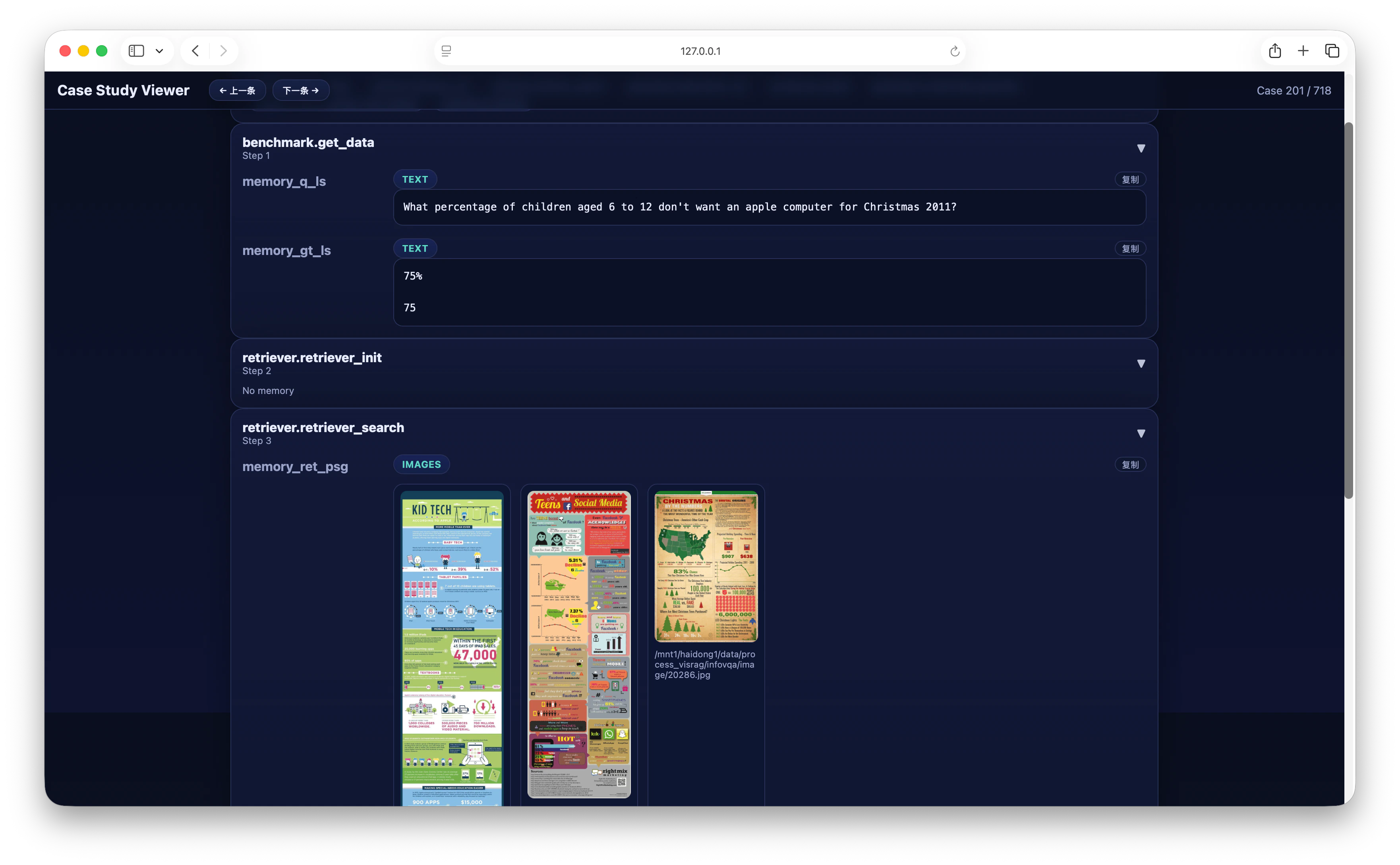 在页面中,可逐条切换不同的 Case,直观对比 `输入问题、检索结果与模型输出` 的对应关系,从而更高效地定位潜在问题、优化 Pipeline 设计,并验证整个推理流程是否符合预期。