> ## Documentation Index
> Fetch the complete documentation index at: https://ultrarag.openbmb.cn/llms.txt
> Use this file to discover all available pages before exploring further.
# Vanilla RAG
我们为该 Demo 录制了一期讲解视频:[📺 bilibili](https://www.bilibili.com/video/BV1B9apz4E7K/?share_source=copy_web\&vd_source=7035ae721e76c8149fb74ea7a2432710)。
## 什么是RAG?
> 想象你在参加一次开卷考试。你本人就是大语言模型,具备理解题目和写答案的能力。\
> 但你不可能记住所有知识点。这时,允许你带一本教材或参考书进考场——这就是检索。\
> 当你翻书找到相关内容,再结合自己的理解去写答案,这样答案既准确又有根据。\
> 这就是 RAG —— 检索增强生成。
RAG(Retrieval-Augmented Generation,检索增强生成)是一种让大语言模型(LLM)在“生成”之前,先去“检索”相关文档或知识库,再结合这些信息生成回答的技术。
### 流程
**检索阶段**:根据用户问题,从文档库中找到最相关的内容(比如知识库、网页等);\\
 **生成阶段**:把检索到的内容作为上下文,输入给 LLM,让它基于这些信息生成回答\\
 ### 作用
* 提升准确度、降低“幻觉”
* 无需重训模型,也能保持时效性和专业性
* 增强可信度
## 语料库编码与索引
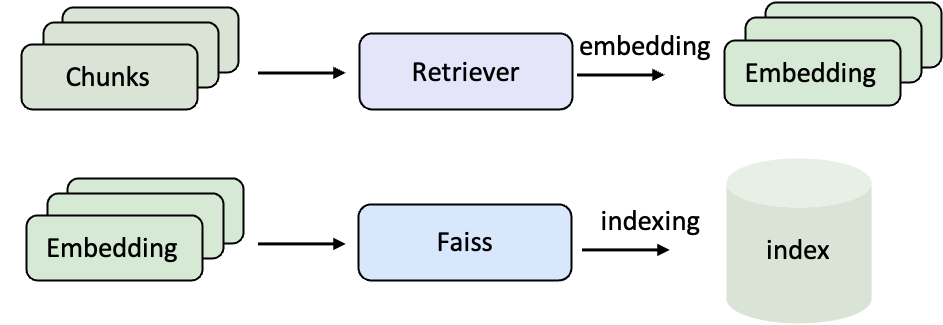
在使用 RAG 之前,需要先将原始文档转化为 向量表示,并建立 检索索引。这样,当用户提问时,系统才能在大规模语料库中快速找到最相关的内容。
* **编码(Embedding)**:把自然语言文本转化为向量,让计算机可以用数学方式比较语义相似度。
* **索引(Indexing)**:把这些向量组织起来,比如用 FAISS,这样检索时才能在几百万条文档中瞬间找到最相关的若干条。
### 作用
* 提升准确度、降低“幻觉”
* 无需重训模型,也能保持时效性和专业性
* 增强可信度
## 语料库编码与索引
在使用 RAG 之前,需要先将原始文档转化为 向量表示,并建立 检索索引。这样,当用户提问时,系统才能在大规模语料库中快速找到最相关的内容。
* **编码(Embedding)**:把自然语言文本转化为向量,让计算机可以用数学方式比较语义相似度。
* **索引(Indexing)**:把这些向量组织起来,比如用 FAISS,这样检索时才能在几百万条文档中瞬间找到最相关的若干条。
 ### 示例语料(Wiki 文本)
```json data/corpus_example.jsonl icon="https://mintcdn.com/ultrarag/T7GffHzZitf6TThi/images/json.svg?fit=max&auto=format&n=T7GffHzZitf6TThi&q=85&s=81a8c440100333f3454ca984a5b0fe5a" theme={null}
{"id": "2066692", "contents": "Truman Sports Complex The Harry S. Truman Sports...."}
{"id": "15106858", "contents": "Arrowhead Stadium 1970s...."}
```
这是典型的 Wiki 语料,其中 id 是文档的唯一标识符,contents 是实际的文本内容。后续我们会对 contents 做向量化并建立索引。
### 编写编码、索引Pipeline
```yaml examples/corpus_index.yaml icon="https://mintcdn.com/ultrarag/T7GffHzZitf6TThi/images/yaml.svg?fit=max&auto=format&n=T7GffHzZitf6TThi&q=85&s=69b41e79144bc908039c2ee3abbb1c3b" theme={null}
# MCP Server
servers:
retriever: servers/retriever
# MCP Client Pipeline
pipeline:
- retriever.retriever_init
- retriever.retriever_embed
- retriever.retriever_index
```
这里定义了一个最小的三步流程:初始化 → 编码 → 建索引。
### 编译Pipeline文件
```shell theme={null}
ultrarag build examples/corpus_index.yaml
```
### 修改参数文件
```yaml examples/parameters/corpus_index_parameter.yaml icon="https://mintcdn.com/ultrarag/T7GffHzZitf6TThi/images/yaml.svg?fit=max&auto=format&n=T7GffHzZitf6TThi&q=85&s=69b41e79144bc908039c2ee3abbb1c3b" theme={null}
retriever:
backend: sentence_transformers
backend_configs:
bm25:
lang: en
save_path: index/bm25
infinity:
bettertransformer: false
model_warmup: false
pooling_method: auto
trust_remote_code: true
openai:
api_key: abc
base_url: https://api.openai.com/v1
model_name: text-embedding-3-small
sentence_transformers:
sentence_transformers_encode:
encode_chunk_size: 256
normalize_embeddings: false
psg_prompt_name: document
psg_task: null
q_prompt_name: query
q_task: null
trust_remote_code: true
batch_size: 16
collection_name: wiki
corpus_path: data/corpus_example.jsonl
embedding_path: embedding/embedding.npy
gpu_ids: '1'
index_backend: faiss
index_backend_configs:
faiss:
index_chunk_size: 10000
index_path: index/index.index
index_use_gpu: true
milvus:
id_field_name: id
id_max_length: 64
index_chunk_size: 1000
index_params:
index_type: AUTOINDEX
metric_type: IP
metric_type: IP
search_params:
metric_type: IP
params: {}
text_field_name: contents
text_max_length: 60000
token: null
uri: index/milvus_demo.db
vector_field_name: vector
is_demo: false
is_multimodal: false
model_name_or_path: openbmb/MiniCPM-Embedding-Light # [!code --]
model_name_or_path: Qwen/Qwen3-Embedding-0.6B # [!code ++]
overwrite: false
```
### 运行Pipeline文件
```shell theme={null}
ultrarag run examples/corpus_index.yaml
```
编码与索引阶段通常涉及大规模语料处理,耗时较长。建议使用 `screen` 或 `nohup` 将任务挂载至后台运行,例如:
```shell theme={null}
nohup ultrarag run examples/corpus_index.yaml > log.txt 2>&1 &
```
运行成功后,就会得到对应的语料向量和索引文件,后续 RAG Pipeline 就可以直接使用它们来完成检索。
## 搭建RAG Pipeline
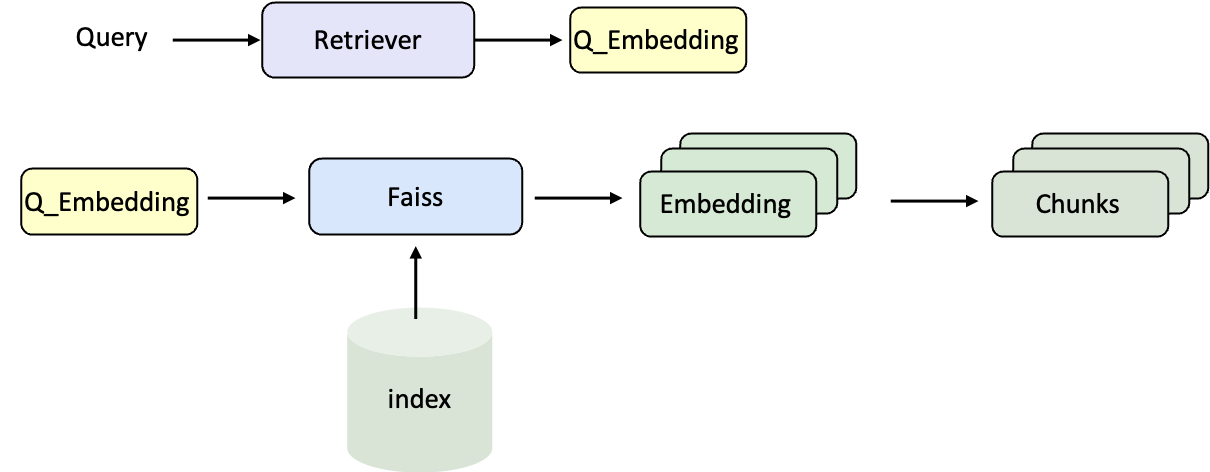
当语料库的索引准备完成后,下一步就是将 检索器 和 大语言模型(LLM) 组合起来,搭建一个完整的 RAG Pipeline。这样,问题可以经过检索找到相关文档,再交由模型生成最终回答。
### 检索流程
### 示例语料(Wiki 文本)
```json data/corpus_example.jsonl icon="https://mintcdn.com/ultrarag/T7GffHzZitf6TThi/images/json.svg?fit=max&auto=format&n=T7GffHzZitf6TThi&q=85&s=81a8c440100333f3454ca984a5b0fe5a" theme={null}
{"id": "2066692", "contents": "Truman Sports Complex The Harry S. Truman Sports...."}
{"id": "15106858", "contents": "Arrowhead Stadium 1970s...."}
```
这是典型的 Wiki 语料,其中 id 是文档的唯一标识符,contents 是实际的文本内容。后续我们会对 contents 做向量化并建立索引。
### 编写编码、索引Pipeline
```yaml examples/corpus_index.yaml icon="https://mintcdn.com/ultrarag/T7GffHzZitf6TThi/images/yaml.svg?fit=max&auto=format&n=T7GffHzZitf6TThi&q=85&s=69b41e79144bc908039c2ee3abbb1c3b" theme={null}
# MCP Server
servers:
retriever: servers/retriever
# MCP Client Pipeline
pipeline:
- retriever.retriever_init
- retriever.retriever_embed
- retriever.retriever_index
```
这里定义了一个最小的三步流程:初始化 → 编码 → 建索引。
### 编译Pipeline文件
```shell theme={null}
ultrarag build examples/corpus_index.yaml
```
### 修改参数文件
```yaml examples/parameters/corpus_index_parameter.yaml icon="https://mintcdn.com/ultrarag/T7GffHzZitf6TThi/images/yaml.svg?fit=max&auto=format&n=T7GffHzZitf6TThi&q=85&s=69b41e79144bc908039c2ee3abbb1c3b" theme={null}
retriever:
backend: sentence_transformers
backend_configs:
bm25:
lang: en
save_path: index/bm25
infinity:
bettertransformer: false
model_warmup: false
pooling_method: auto
trust_remote_code: true
openai:
api_key: abc
base_url: https://api.openai.com/v1
model_name: text-embedding-3-small
sentence_transformers:
sentence_transformers_encode:
encode_chunk_size: 256
normalize_embeddings: false
psg_prompt_name: document
psg_task: null
q_prompt_name: query
q_task: null
trust_remote_code: true
batch_size: 16
collection_name: wiki
corpus_path: data/corpus_example.jsonl
embedding_path: embedding/embedding.npy
gpu_ids: '1'
index_backend: faiss
index_backend_configs:
faiss:
index_chunk_size: 10000
index_path: index/index.index
index_use_gpu: true
milvus:
id_field_name: id
id_max_length: 64
index_chunk_size: 1000
index_params:
index_type: AUTOINDEX
metric_type: IP
metric_type: IP
search_params:
metric_type: IP
params: {}
text_field_name: contents
text_max_length: 60000
token: null
uri: index/milvus_demo.db
vector_field_name: vector
is_demo: false
is_multimodal: false
model_name_or_path: openbmb/MiniCPM-Embedding-Light # [!code --]
model_name_or_path: Qwen/Qwen3-Embedding-0.6B # [!code ++]
overwrite: false
```
### 运行Pipeline文件
```shell theme={null}
ultrarag run examples/corpus_index.yaml
```
编码与索引阶段通常涉及大规模语料处理,耗时较长。建议使用 `screen` 或 `nohup` 将任务挂载至后台运行,例如:
```shell theme={null}
nohup ultrarag run examples/corpus_index.yaml > log.txt 2>&1 &
```
运行成功后,就会得到对应的语料向量和索引文件,后续 RAG Pipeline 就可以直接使用它们来完成检索。
## 搭建RAG Pipeline
当语料库的索引准备完成后,下一步就是将 检索器 和 大语言模型(LLM) 组合起来,搭建一个完整的 RAG Pipeline。这样,问题可以经过检索找到相关文档,再交由模型生成最终回答。
### 检索流程
 ### 生成流程
### 数据格式(以 NQ 数据集为例)
```json data/sample_nq_10.jsonl icon="https://mintcdn.com/ultrarag/T7GffHzZitf6TThi/images/json.svg?fit=max&auto=format&n=T7GffHzZitf6TThi&q=85&s=81a8c440100333f3454ca984a5b0fe5a" theme={null}
{"id": 0, "question": "when was the last time anyone was on the moon", "golden_answers": ["14 December 1972 UTC", "December 1972"], "meta_data": {}}
{"id": 1, "question": "who wrote he ain't heavy he's my brother lyrics", "golden_answers": ["Bobby Scott", "Bob Russell"], "meta_data": {}}
{"id": 2, "question": "how many seasons of the bastard executioner are there", "golden_answers": ["one", "one season"], "meta_data": {}}
{"id": 3, "question": "when did the eagles win last super bowl", "golden_answers": ["2017"], "meta_data": {}}
{"id": 4, "question": "who won last year's ncaa women's basketball", "golden_answers": ["South Carolina"], "meta_data": {}}
```
每条样本包含问题、标准答案(golden\_answers)和附加信息(meta\_data),后续会作为输入与评测基准。
### 编写RAG Pipeline
```yaml examples/rag.yaml icon="https://mintcdn.com/ultrarag/T7GffHzZitf6TThi/images/yaml.svg?fit=max&auto=format&n=T7GffHzZitf6TThi&q=85&s=69b41e79144bc908039c2ee3abbb1c3b" theme={null}
# MCP Server
servers:
benchmark: servers/benchmark
retriever: servers/retriever
prompt: servers/prompt
generation: servers/generation
evaluation: servers/evaluation
custom: servers/custom
# MCP Client Pipeline
pipeline:
- benchmark.get_data
- retriever.retriever_init
- retriever.retriever_search
- generation.generation_init
- prompt.qa_rag_boxed
- generation.generate
- custom.output_extract_from_boxed
- evaluation.evaluate
```
整个流程依次完成:
1. 读取数据 → 2. 初始化检索器并搜索 → 3. 启动 LLM 服务 → 4. 拼接 Prompt → 5. 生成回答 → 6. 提取结果 → 7. 评测性能。
### 编译 Pipeline 文件
```shell theme={null}
ultrarag build examples/rag.yaml
```
### 修改参数文件(指定数据集、模型与检索配置)
```yaml examples/parameters/rag_parameter.yaml icon="https://mintcdn.com/ultrarag/T7GffHzZitf6TThi/images/yaml.svg?fit=max&auto=format&n=T7GffHzZitf6TThi&q=85&s=69b41e79144bc908039c2ee3abbb1c3b" theme={null}
benchmark:
benchmark:
key_map:
gt_ls: golden_answers
q_ls: question
limit: -1
name: nq
path: data/sample_nq_10.jsonl
seed: 42
shuffle: false
custom: {}
evaluation:
metrics:
- acc
- f1
- em
- coverem
- stringem
- rouge-1
- rouge-2
- rouge-l
save_path: output/evaluate_results.json
generation:
backend: vllm
backend_configs:
hf:
batch_size: 8
gpu_ids: 2,3
model_name_or_path: openbmb/MiniCPM4-8B
trust_remote_code: true
openai:
api_key: abc
base_delay: 1.0
base_url: http://localhost:8000/v1
concurrency: 8
model_name: MiniCPM4-8B
retries: 3
vllm:
dtype: auto
gpu_ids: 2,3
gpu_memory_utilization: 0.9
model_name_or_path: openbmb/MiniCPM4-8B # [!code --]
model_name_or_path: Qwen/Qwen3-8B # [!code ++]
trust_remote_code: true
extra_params:
chat_template_kwargs:
enable_thinking: false
sampling_params:
max_tokens: 2048
temperature: 0.7
top_p: 0.8
system_prompt: ''
prompt:
template: prompt/qa_boxed.jinja # [!code --]
template: prompt/qa_rag_boxed.jinja # [!code ++]
retriever:
backend: sentence_transformers
backend_configs:
bm25:
lang: en
save_path: index/bm25
infinity:
bettertransformer: false
model_warmup: false
pooling_method: auto
trust_remote_code: true
openai:
api_key: abc
base_url: https://api.openai.com/v1
model_name: text-embedding-3-small
sentence_transformers:
sentence_transformers_encode:
encode_chunk_size: 256
normalize_embeddings: false
psg_prompt_name: document
psg_task: null
q_prompt_name: query
q_task: null
trust_remote_code: true
batch_size: 16
collection_name: wiki
corpus_path: data/corpus_example.jsonl
gpu_ids: '1'
index_backend: faiss
index_backend_configs:
faiss:
index_chunk_size: 10000
index_path: index/index.index
index_use_gpu: true
milvus:
id_field_name: id
id_max_length: 64
index_chunk_size: 1000
index_params:
index_type: AUTOINDEX
metric_type: IP
metric_type: IP
search_params:
metric_type: IP
params: {}
text_field_name: contents
text_max_length: 60000
token: null
uri: index/milvus_demo.db
vector_field_name: vector
is_demo: false
is_multimodal: false
model_name_or_path: openbmb/MiniCPM-Embedding-Light # [!code --]
model_name_or_path: Qwen/Qwen3-Embedding-0.6B # [!code ++]
query_instruction: ''
top_k: 5
```
### 运行Pipeline文件
```shell theme={null}
ultrarag run examples/rag.yaml
```
### 查看生成结果
使用可视化脚本快速浏览模型输出
```shell theme={null}
python ./script/case_study.py \
--data output/memory_nq_rag_full_20251010_145420.json \
--host 127.0.0.1 \
--port 8080 \
--title "Case Study Viewer"
```
### 生成流程
### 数据格式(以 NQ 数据集为例)
```json data/sample_nq_10.jsonl icon="https://mintcdn.com/ultrarag/T7GffHzZitf6TThi/images/json.svg?fit=max&auto=format&n=T7GffHzZitf6TThi&q=85&s=81a8c440100333f3454ca984a5b0fe5a" theme={null}
{"id": 0, "question": "when was the last time anyone was on the moon", "golden_answers": ["14 December 1972 UTC", "December 1972"], "meta_data": {}}
{"id": 1, "question": "who wrote he ain't heavy he's my brother lyrics", "golden_answers": ["Bobby Scott", "Bob Russell"], "meta_data": {}}
{"id": 2, "question": "how many seasons of the bastard executioner are there", "golden_answers": ["one", "one season"], "meta_data": {}}
{"id": 3, "question": "when did the eagles win last super bowl", "golden_answers": ["2017"], "meta_data": {}}
{"id": 4, "question": "who won last year's ncaa women's basketball", "golden_answers": ["South Carolina"], "meta_data": {}}
```
每条样本包含问题、标准答案(golden\_answers)和附加信息(meta\_data),后续会作为输入与评测基准。
### 编写RAG Pipeline
```yaml examples/rag.yaml icon="https://mintcdn.com/ultrarag/T7GffHzZitf6TThi/images/yaml.svg?fit=max&auto=format&n=T7GffHzZitf6TThi&q=85&s=69b41e79144bc908039c2ee3abbb1c3b" theme={null}
# MCP Server
servers:
benchmark: servers/benchmark
retriever: servers/retriever
prompt: servers/prompt
generation: servers/generation
evaluation: servers/evaluation
custom: servers/custom
# MCP Client Pipeline
pipeline:
- benchmark.get_data
- retriever.retriever_init
- retriever.retriever_search
- generation.generation_init
- prompt.qa_rag_boxed
- generation.generate
- custom.output_extract_from_boxed
- evaluation.evaluate
```
整个流程依次完成:
1. 读取数据 → 2. 初始化检索器并搜索 → 3. 启动 LLM 服务 → 4. 拼接 Prompt → 5. 生成回答 → 6. 提取结果 → 7. 评测性能。
### 编译 Pipeline 文件
```shell theme={null}
ultrarag build examples/rag.yaml
```
### 修改参数文件(指定数据集、模型与检索配置)
```yaml examples/parameters/rag_parameter.yaml icon="https://mintcdn.com/ultrarag/T7GffHzZitf6TThi/images/yaml.svg?fit=max&auto=format&n=T7GffHzZitf6TThi&q=85&s=69b41e79144bc908039c2ee3abbb1c3b" theme={null}
benchmark:
benchmark:
key_map:
gt_ls: golden_answers
q_ls: question
limit: -1
name: nq
path: data/sample_nq_10.jsonl
seed: 42
shuffle: false
custom: {}
evaluation:
metrics:
- acc
- f1
- em
- coverem
- stringem
- rouge-1
- rouge-2
- rouge-l
save_path: output/evaluate_results.json
generation:
backend: vllm
backend_configs:
hf:
batch_size: 8
gpu_ids: 2,3
model_name_or_path: openbmb/MiniCPM4-8B
trust_remote_code: true
openai:
api_key: abc
base_delay: 1.0
base_url: http://localhost:8000/v1
concurrency: 8
model_name: MiniCPM4-8B
retries: 3
vllm:
dtype: auto
gpu_ids: 2,3
gpu_memory_utilization: 0.9
model_name_or_path: openbmb/MiniCPM4-8B # [!code --]
model_name_or_path: Qwen/Qwen3-8B # [!code ++]
trust_remote_code: true
extra_params:
chat_template_kwargs:
enable_thinking: false
sampling_params:
max_tokens: 2048
temperature: 0.7
top_p: 0.8
system_prompt: ''
prompt:
template: prompt/qa_boxed.jinja # [!code --]
template: prompt/qa_rag_boxed.jinja # [!code ++]
retriever:
backend: sentence_transformers
backend_configs:
bm25:
lang: en
save_path: index/bm25
infinity:
bettertransformer: false
model_warmup: false
pooling_method: auto
trust_remote_code: true
openai:
api_key: abc
base_url: https://api.openai.com/v1
model_name: text-embedding-3-small
sentence_transformers:
sentence_transformers_encode:
encode_chunk_size: 256
normalize_embeddings: false
psg_prompt_name: document
psg_task: null
q_prompt_name: query
q_task: null
trust_remote_code: true
batch_size: 16
collection_name: wiki
corpus_path: data/corpus_example.jsonl
gpu_ids: '1'
index_backend: faiss
index_backend_configs:
faiss:
index_chunk_size: 10000
index_path: index/index.index
index_use_gpu: true
milvus:
id_field_name: id
id_max_length: 64
index_chunk_size: 1000
index_params:
index_type: AUTOINDEX
metric_type: IP
metric_type: IP
search_params:
metric_type: IP
params: {}
text_field_name: contents
text_max_length: 60000
token: null
uri: index/milvus_demo.db
vector_field_name: vector
is_demo: false
is_multimodal: false
model_name_or_path: openbmb/MiniCPM-Embedding-Light # [!code --]
model_name_or_path: Qwen/Qwen3-Embedding-0.6B # [!code ++]
query_instruction: ''
top_k: 5
```
### 运行Pipeline文件
```shell theme={null}
ultrarag run examples/rag.yaml
```
### 查看生成结果
使用可视化脚本快速浏览模型输出
```shell theme={null}
python ./script/case_study.py \
--data output/memory_nq_rag_full_20251010_145420.json \
--host 127.0.0.1 \
--port 8080 \
--title "Case Study Viewer"
```