> ## Documentation Index
> Fetch the complete documentation index at: https://ultrarag.openbmb.cn/llms.txt
> Use this file to discover all available pages before exploring further.
# Case Study
UltraRAG provides a convenient Case Study visualization mechanism to help researchers quickly check and analyze whether the built Pipeline works as expected.
After running the Pipeline, the system will automatically generate a memory log file in the output folder.
Just execute the following command to start the Case Study visualization webpage:
```shell theme={null}
python ./script/case_study.py \
--data output/memory_nq_rag_branch_20251014_152438.json \
--host 127.0.0.1 \
--port 8070 \
--title "Case Study Viewer"
```
Please adjust parameters such as file path and port number according to the actual situation.
After successful startup, you can access the corresponding address through a browser to enter the Case Study Viewer interface. The interface displays the inputs and outputs of each stage of the Pipeline in an intuitive visual way, facilitating the step-by-step review of the reasoning chain and intermediate states.
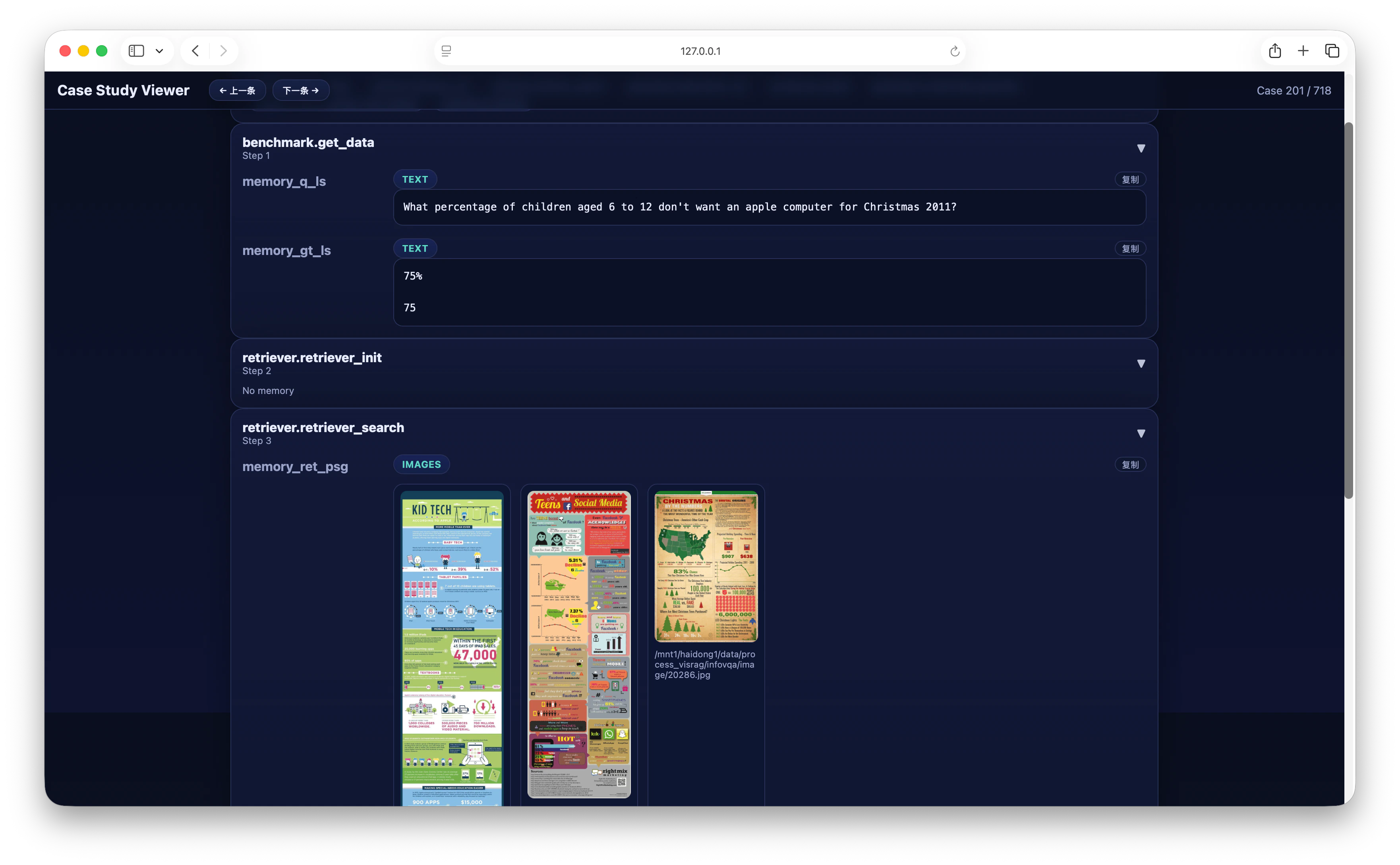 In the page, you can switch between different Cases one by one to intuitively compare the correspondence between `input question, retrieval results, and model output`, thereby more efficiently locating potential problems, optimizing Pipeline design, and verifying whether the entire reasoning process meets expectations.