> ## Documentation Index
> Fetch the complete documentation index at: https://ultrarag.openbmb.cn/llms.txt
> Use this file to discover all available pages before exploring further.
# Quick Start
This section will help you quickly understand how to run a complete RAG Pipeline based on UltraRAG. The usage process of UltraRAG mainly includes the following three stages:
* Write Pipeline configuration file
* Compile Pipeline and adjust parameters
* Run Pipeline
In addition, you can also analyze and evaluate the running results through visualization tools.
If you haven't installed UltraRAG yet, please refer to [Installation](/pages/en/getting_started/installation).
For a more complete RAG development practice, please check the full documentation.
## Step 1: Write Pipeline Configuration File
Please ensure that the current working directory is located at the UltraRAG root directory
Create and write your Pipeline configuration file in the `examples` folder, for example:
```yaml examples/rag_full.yaml icon="https://mintcdn.com/ultrarag/T7GffHzZitf6TThi/images/yaml.svg?fit=max&auto=format&n=T7GffHzZitf6TThi&q=85&s=69b41e79144bc908039c2ee3abbb1c3b" theme={null}
# Vanilla RAG with Corpus Indexing Demo
# MCP Server
servers:
benchmark: servers/benchmark
retriever: servers/retriever
prompt: servers/prompt
generation: servers/generation
evaluation: servers/evaluation
custom: servers/custom
# MCP Client Pipeline
pipeline:
- benchmark.get_data
- retriever.retriever_init
- retriever.retriever_embed
- retriever.retriever_index
- retriever.retriever_search
- generation.generation_init
- prompt.qa_rag_boxed
- generation.generate
- custom.output_extract_from_boxed
- evaluation.evaluate
```
UltraRAG's Pipeline configuration file needs to include the following two parts:
* `servers`: Declare the various modules (Servers) depended on by the current process. For example, the `retriever` Server is required for the retrieval stage.
* `pipeline`: Define the calling sequence of functional functions (Tools) in each Server. This example shows a complete process from data loading, retrieval encoding and index construction, to generation and evaluation.
## Step 2: Compile Pipeline and Adjust Parameters
Before running the code, you first need to configure the parameters required for operation. UltraRAG provides a shortcut `build` command, which can automatically generate the complete parameter file depended on by the current Pipeline.
The system will read the `parameter.yaml` file of each Server, parse all parameter items involved in this process, and consolidate them into an independent configuration file. Execute the following command:
```shell theme={null}
ultrarag build examples/rag_full.yaml
```
After execution, the terminal will output content as follows:
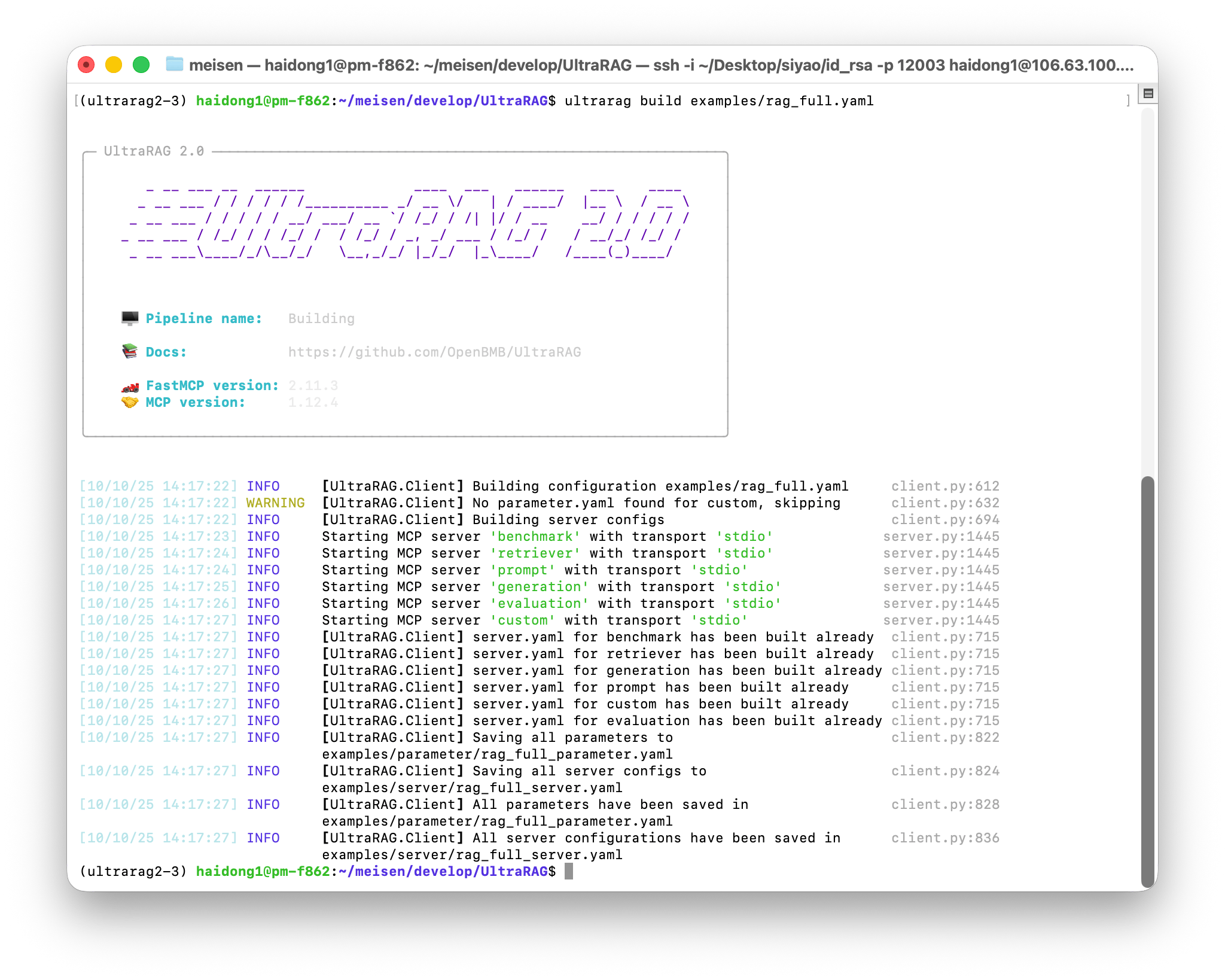 The system will generate the corresponding parameter configuration file in the `examples/parameters/` folder. Open the file and modify relevant parameters according to the actual situation, for example:
```yaml examples/parameters/rag_full_parameter.yaml icon="https://mintcdn.com/ultrarag/T7GffHzZitf6TThi/images/yaml.svg?fit=max&auto=format&n=T7GffHzZitf6TThi&q=85&s=69b41e79144bc908039c2ee3abbb1c3b" theme={null}
benchmark:
benchmark:
key_map:
gt_ls: golden_answers
q_ls: question
limit: -1
name: nq
path: data/sample_nq_10.jsonl
seed: 42
shuffle: false
custom: {}
evaluation:
metrics:
- acc
- f1
- em
- coverem
- stringem
- rouge-1
- rouge-2
- rouge-l
save_path: output/evaluate_results.json
generation:
backend: vllm
backend_configs:
hf:
batch_size: 8
gpu_ids: 2,3
model_name_or_path: openbmb/MiniCPM4-8B
trust_remote_code: true
openai:
api_key: 'abc'
base_delay: 1.0
base_url: http://localhost:8000/v1
concurrency: 8
model_name: MiniCPM4-8B
retries: 3
vllm:
dtype: auto
gpu_ids: 5
gpu_memory_utilization: 0.5
model_name_or_path: openbmb/MiniCPM4-8B # [!code --]
model_name_or_path: Qwen/Qwen3-8B # [!code ++]
trust_remote_code: true
extra_params:
chat_template_kwargs:
enable_thinking: false
sampling_params:
max_tokens: 2048
temperature: 0.7
top_p: 0.8
system_prompt: ''
prompt:
template: prompt/qa_boxed.jinja # [!code --]
template: prompt/qa_rag_boxed.jinja # [!code ++]
retriever:
backend: sentence_transformers
backend_configs:
bm25:
lang: en
save_path: index/bm25
infinity:
bettertransformer: false
model_warmup: false
pooling_method: auto
trust_remote_code: true
openai:
api_key: 'abc'
base_url: https://api.openai.com/v1
model_name: text-embedding-3-small
sentence_transformers:
sentence_transformers_encode:
encode_chunk_size: 256
normalize_embeddings: false
psg_prompt_name: document
psg_task: null
q_prompt_name: query
q_task: null
trust_remote_code: true
batch_size: 16
collection_name: wiki
corpus_path: data/corpus_example.jsonl
embedding_path: embedding/embedding.npy
gpu_ids: '5'
index_backend: faiss
index_backend_configs:
faiss:
index_chunk_size: 10000
index_path: index/index.index
index_use_gpu: true
milvus:
id_field_name: id
id_max_length: 64
index_chunk_size: 1000
index_params:
index_type: AUTOINDEX
metric_type: IP
metric_type: IP
search_params:
metric_type: IP
params: {}
text_field_name: contents
text_max_length: 60000
token: null
uri: index/milvus_demo.db
vector_field_name: vector
is_demo: false
is_multimodal: false
model_name_or_path: openbmb/MiniCPM-Embedding-Light # [!code --]
model_name_or_path: Qwen/Qwen3-Embedding-0.6B # [!code ++]
overwrite: false
query_instruction: ''
top_k: 5
```
You can modify the parameters according to the actual situation, for example:
* Adjust `template` to the RAG template `prompt/qa_rag_boxed.jinja`;
* Replace `model_name_or_path` of the retriever and generator with the local downloaded model path;
* If running in a multi-GPU environment, modify `gpu_ids` to match available devices.
## Step 3: Run Pipeline
When the parameter configuration is complete, you can run the entire process with one click. Execute the following command:
```shell theme={null}
ultrarag run examples/rag_full.yaml
```
The system will sequentially execute the various Servers and Tools defined in the configuration file, and output running logs and progress information in the terminal in real time:
The system will generate the corresponding parameter configuration file in the `examples/parameters/` folder. Open the file and modify relevant parameters according to the actual situation, for example:
```yaml examples/parameters/rag_full_parameter.yaml icon="https://mintcdn.com/ultrarag/T7GffHzZitf6TThi/images/yaml.svg?fit=max&auto=format&n=T7GffHzZitf6TThi&q=85&s=69b41e79144bc908039c2ee3abbb1c3b" theme={null}
benchmark:
benchmark:
key_map:
gt_ls: golden_answers
q_ls: question
limit: -1
name: nq
path: data/sample_nq_10.jsonl
seed: 42
shuffle: false
custom: {}
evaluation:
metrics:
- acc
- f1
- em
- coverem
- stringem
- rouge-1
- rouge-2
- rouge-l
save_path: output/evaluate_results.json
generation:
backend: vllm
backend_configs:
hf:
batch_size: 8
gpu_ids: 2,3
model_name_or_path: openbmb/MiniCPM4-8B
trust_remote_code: true
openai:
api_key: 'abc'
base_delay: 1.0
base_url: http://localhost:8000/v1
concurrency: 8
model_name: MiniCPM4-8B
retries: 3
vllm:
dtype: auto
gpu_ids: 5
gpu_memory_utilization: 0.5
model_name_or_path: openbmb/MiniCPM4-8B # [!code --]
model_name_or_path: Qwen/Qwen3-8B # [!code ++]
trust_remote_code: true
extra_params:
chat_template_kwargs:
enable_thinking: false
sampling_params:
max_tokens: 2048
temperature: 0.7
top_p: 0.8
system_prompt: ''
prompt:
template: prompt/qa_boxed.jinja # [!code --]
template: prompt/qa_rag_boxed.jinja # [!code ++]
retriever:
backend: sentence_transformers
backend_configs:
bm25:
lang: en
save_path: index/bm25
infinity:
bettertransformer: false
model_warmup: false
pooling_method: auto
trust_remote_code: true
openai:
api_key: 'abc'
base_url: https://api.openai.com/v1
model_name: text-embedding-3-small
sentence_transformers:
sentence_transformers_encode:
encode_chunk_size: 256
normalize_embeddings: false
psg_prompt_name: document
psg_task: null
q_prompt_name: query
q_task: null
trust_remote_code: true
batch_size: 16
collection_name: wiki
corpus_path: data/corpus_example.jsonl
embedding_path: embedding/embedding.npy
gpu_ids: '5'
index_backend: faiss
index_backend_configs:
faiss:
index_chunk_size: 10000
index_path: index/index.index
index_use_gpu: true
milvus:
id_field_name: id
id_max_length: 64
index_chunk_size: 1000
index_params:
index_type: AUTOINDEX
metric_type: IP
metric_type: IP
search_params:
metric_type: IP
params: {}
text_field_name: contents
text_max_length: 60000
token: null
uri: index/milvus_demo.db
vector_field_name: vector
is_demo: false
is_multimodal: false
model_name_or_path: openbmb/MiniCPM-Embedding-Light # [!code --]
model_name_or_path: Qwen/Qwen3-Embedding-0.6B # [!code ++]
overwrite: false
query_instruction: ''
top_k: 5
```
You can modify the parameters according to the actual situation, for example:
* Adjust `template` to the RAG template `prompt/qa_rag_boxed.jinja`;
* Replace `model_name_or_path` of the retriever and generator with the local downloaded model path;
* If running in a multi-GPU environment, modify `gpu_ids` to match available devices.
## Step 3: Run Pipeline
When the parameter configuration is complete, you can run the entire process with one click. Execute the following command:
```shell theme={null}
ultrarag run examples/rag_full.yaml
```
The system will sequentially execute the various Servers and Tools defined in the configuration file, and output running logs and progress information in the terminal in real time:
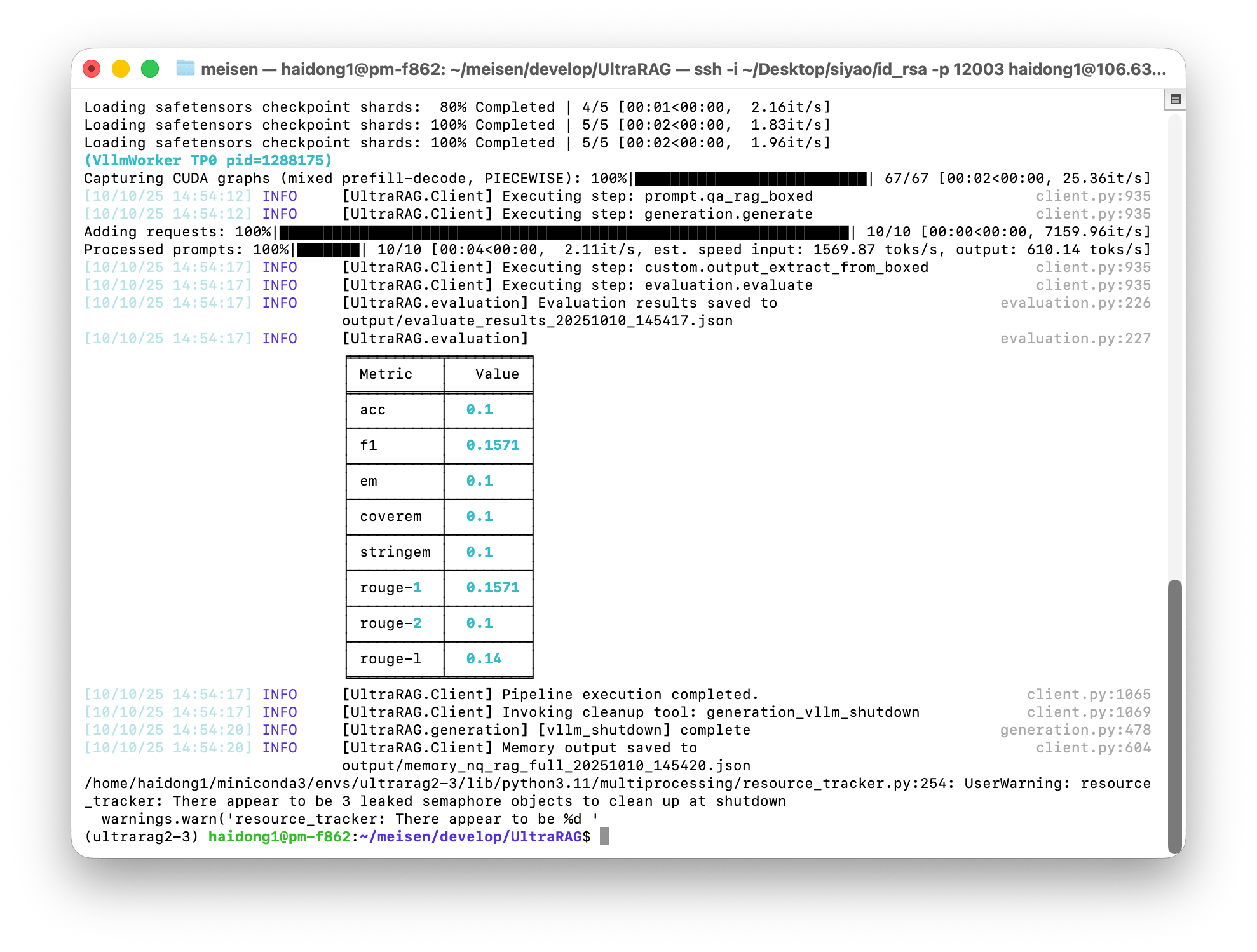 After running, the results (such as generated content, evaluation reports, etc.) will be automatically saved in the corresponding output path, such as `output/memory_nq_rag_full_20251010_145420.json` in this example, which can be directly used for subsequent analysis and visual display.
## Step 4: Visual Analysis Case Study
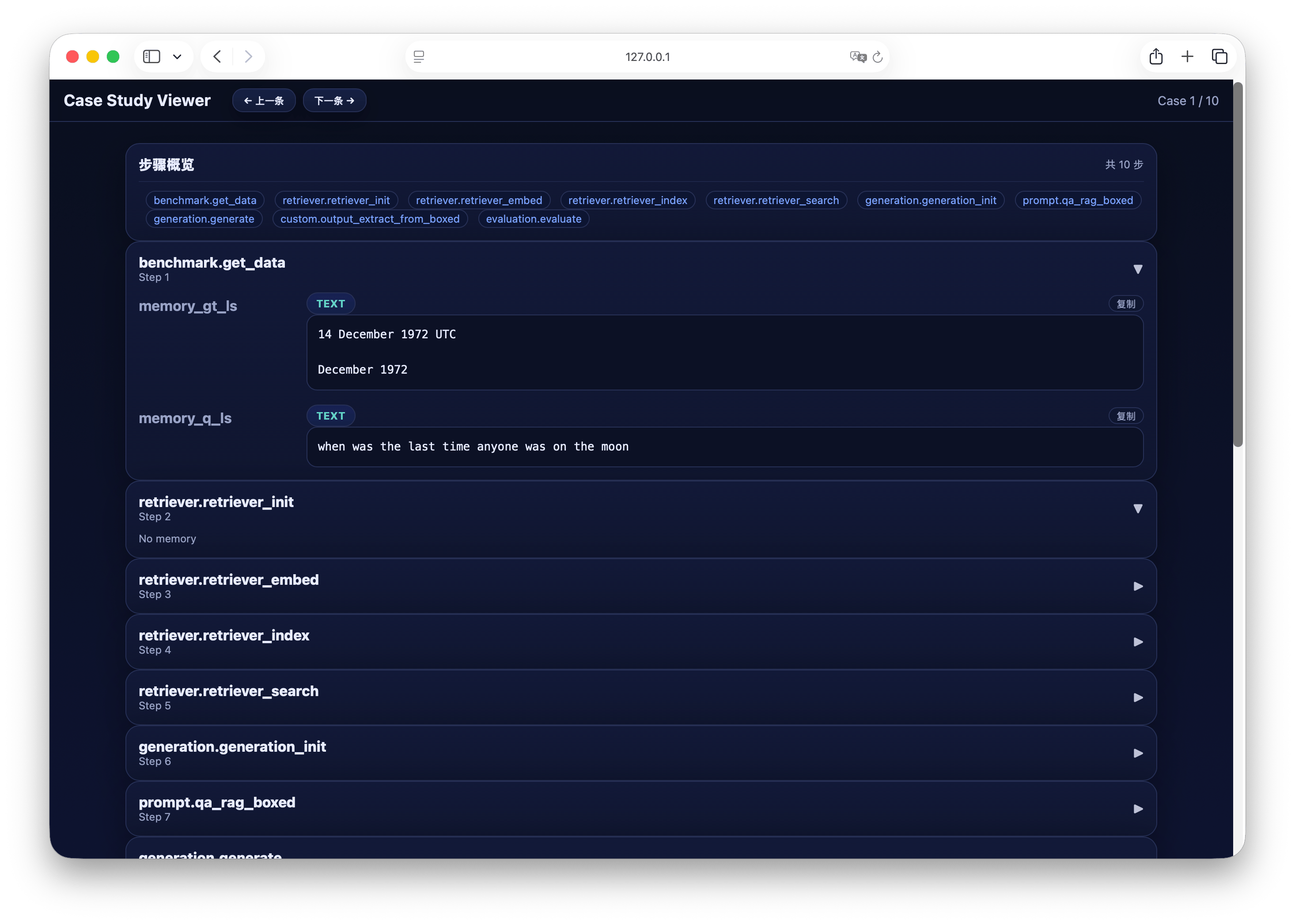
After completing the process run, you can quickly analyze the generation results through the built-in visualization tool. Execute the following command to start the Case Study Viewer:
```shell theme={null}
python ./script/case_study.py \
--data output/memory_nq_rag_full_20251010_145420.json \
--host 127.0.0.1 \
--port 8080 \
--title "Case Study Viewer"
```
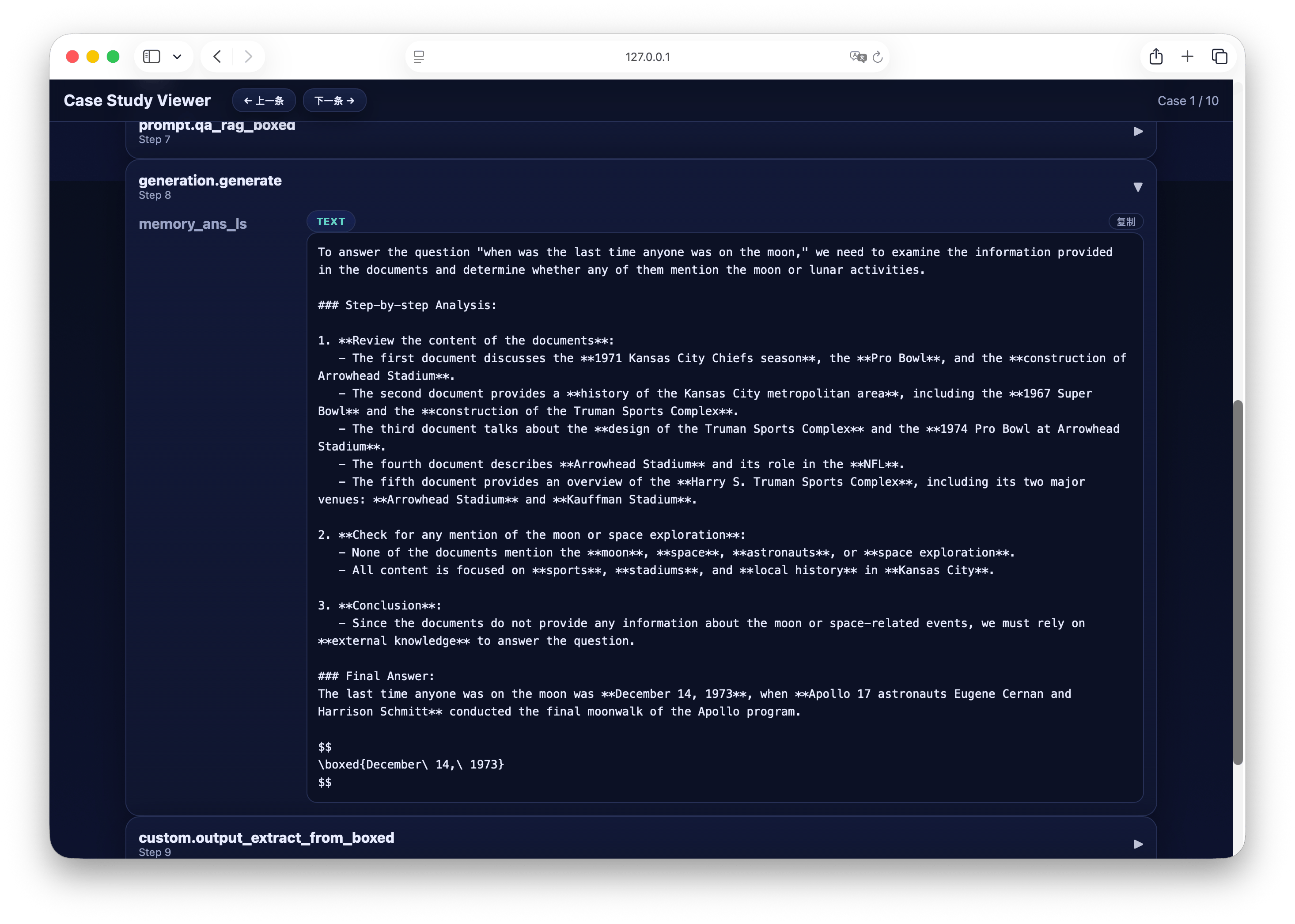
After successful operation, the terminal will display the access address. Open the browser and enter the address to enter the Case Study Viewer interface to interactively browse and analyze the results.
The interface example is shown below:
After running, the results (such as generated content, evaluation reports, etc.) will be automatically saved in the corresponding output path, such as `output/memory_nq_rag_full_20251010_145420.json` in this example, which can be directly used for subsequent analysis and visual display.
## Step 4: Visual Analysis Case Study
After completing the process run, you can quickly analyze the generation results through the built-in visualization tool. Execute the following command to start the Case Study Viewer:
```shell theme={null}
python ./script/case_study.py \
--data output/memory_nq_rag_full_20251010_145420.json \
--host 127.0.0.1 \
--port 8080 \
--title "Case Study Viewer"
```
After successful operation, the terminal will display the access address. Open the browser and enter the address to enter the Case Study Viewer interface to interactively browse and analyze the results.
The interface example is shown below:
 ## Summary
At this point, you have completed the full RAG practice process from **Pipeline Configuration**, **Parameter Compilation** to **Process Running** and **Visual Analysis**.
UltraRAG makes the construction, operation, and analysis of RAG systems more efficient, intuitive, and reproducible through a modular MCP architecture and a unified evaluation system.
Based on this, you can:
* Replace different models or retrievers to explore various combination effects;
* Customize new Servers and Tools to extend system functions;
* Use the evaluation module to quickly compare experimental results and conduct systematic research.
## Summary
At this point, you have completed the full RAG practice process from **Pipeline Configuration**, **Parameter Compilation** to **Process Running** and **Visual Analysis**.
UltraRAG makes the construction, operation, and analysis of RAG systems more efficient, intuitive, and reproducible through a modular MCP architecture and a unified evaluation system.
Based on this, you can:
* Replace different models or retrievers to explore various combination effects;
* Customize new Servers and Tools to extend system functions;
* Use the evaluation module to quickly compare experimental results and conduct systematic research.