> ## Documentation Index
> Fetch the complete documentation index at: https://ultrarag.openbmb.cn/llms.txt
> Use this file to discover all available pages before exploring further.
# Vanilla RAG
We recorded an explanatory video for this Demo: [📺 bilibili](https://www.bilibili.com/video/BV1B9apz4E7K/?share_source=copy_web\&vd_source=7035ae721e76c8149fb74ea7a2432710).
## What is RAG?
> Imagine you are taking an open-book exam. You are the large language model yourself, capable of understanding questions and writing answers.
> But you can't remember all the knowledge points. At this time, you are allowed to bring a textbook or reference book into the exam room — this is retrieval.
> When you find relevant content in the book, and then combine it with your own understanding to write the answer, the answer is both accurate and grounded.
> This is RAG — Retrieval-Augmented Generation.
RAG (Retrieval-Augmented Generation) is a technology that allows Large Language Models (LLMs) to "retrieve" relevant documents or knowledge bases before "generating" answers, and then combine this information to generate responses.
### Process
**Retrieval Phase**: Find the most relevant content from the document library (such as knowledge bases, web pages, etc.) based on user questions;
 **Generation Phase**: Use the retrieved content as context and input it to the LLM, allowing it to generate answers based on this information.
 ### Benefits
* Improve accuracy and reduce "hallucinations"
* Maintain timeliness and professionalism without retraining the model
* Enhance credibility
## Corpus Encoding and Indexing
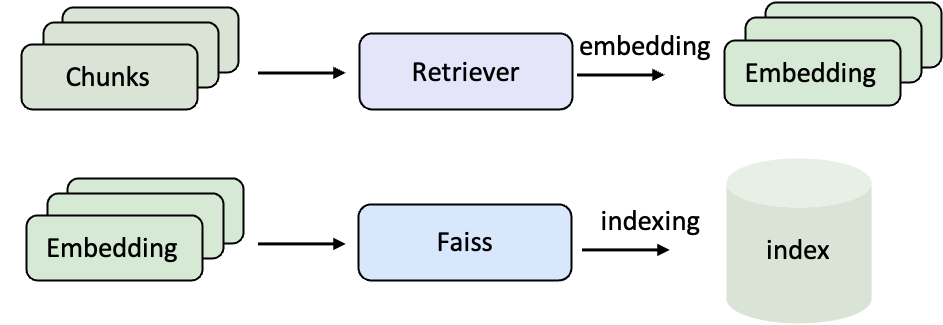
Before using RAG, original documents need to be converted into vector representations and a retrieval index needs to be established. In this way, when a user asks a question, the system can quickly find the most relevant content in the large-scale corpus.
* **Embedding**: Convert natural language text into vectors so that computers can compare semantic similarities mathematically.
* **Indexing**: Organize these vectors, for example using FAISS, so that retrieval can instantly find the most relevant entries among millions of documents.
### Benefits
* Improve accuracy and reduce "hallucinations"
* Maintain timeliness and professionalism without retraining the model
* Enhance credibility
## Corpus Encoding and Indexing
Before using RAG, original documents need to be converted into vector representations and a retrieval index needs to be established. In this way, when a user asks a question, the system can quickly find the most relevant content in the large-scale corpus.
* **Embedding**: Convert natural language text into vectors so that computers can compare semantic similarities mathematically.
* **Indexing**: Organize these vectors, for example using FAISS, so that retrieval can instantly find the most relevant entries among millions of documents.
 ### Example Corpus (Wiki Text)
```json data/corpus_example.jsonl icon="https://mintcdn.com/ultrarag/T7GffHzZitf6TThi/images/json.svg?fit=max&auto=format&n=T7GffHzZitf6TThi&q=85&s=81a8c440100333f3454ca984a5b0fe5a" theme={null}
{"id": "2066692", "contents": "Truman Sports Complex The Harry S. Truman Sports...."}
{"id": "15106858", "contents": "Arrowhead Stadium 1970s...."}
```
This is a typical Wiki corpus, where `id` is the unique identifier of the document, and `contents` is the actual text content. We will vectorize `contents` and build an index later.
### Write Encoding and Indexing Pipeline
```yaml examples/corpus_index.yaml icon="https://mintcdn.com/ultrarag/T7GffHzZitf6TThi/images/yaml.svg?fit=max&auto=format&n=T7GffHzZitf6TThi&q=85&s=69b41e79144bc908039c2ee3abbb1c3b" theme={null}
# MCP Server
servers:
retriever: servers/retriever
# MCP Client Pipeline
pipeline:
- retriever.retriever_init
- retriever.retriever_embed
- retriever.retriever_index
```
Here a minimal three-step process is defined: Initialization → Embedding → Indexing.
### Compile Pipeline File
```shell theme={null}
ultrarag build examples/corpus_index.yaml
```
### Modify Parameter File
```yaml examples/parameters/corpus_index_parameter.yaml icon="https://mintcdn.com/ultrarag/T7GffHzZitf6TThi/images/yaml.svg?fit=max&auto=format&n=T7GffHzZitf6TThi&q=85&s=69b41e79144bc908039c2ee3abbb1c3b" theme={null}
retriever:
backend: sentence_transformers
backend_configs:
bm25:
lang: en
save_path: index/bm25
infinity:
bettertransformer: false
model_warmup: false
pooling_method: auto
trust_remote_code: true
openai:
api_key: abc
base_url: https://api.openai.com/v1
model_name: text-embedding-3-small
sentence_transformers:
sentence_transformers_encode:
encode_chunk_size: 256
normalize_embeddings: false
psg_prompt_name: document
psg_task: null
q_prompt_name: query
q_task: null
trust_remote_code: true
batch_size: 16
collection_name: wiki
corpus_path: data/corpus_example.jsonl
embedding_path: embedding/embedding.npy
gpu_ids: '1'
index_backend: faiss
index_backend_configs:
faiss:
index_chunk_size: 10000
index_path: index/index.index
index_use_gpu: true
milvus:
id_field_name: id
id_max_length: 64
index_chunk_size: 1000
index_params:
index_type: AUTOINDEX
metric_type: IP
metric_type: IP
search_params:
metric_type: IP
params: {}
text_field_name: contents
text_max_length: 60000
token: null
uri: index/milvus_demo.db
vector_field_name: vector
is_demo: false
is_multimodal: false
model_name_or_path: openbmb/MiniCPM-Embedding-Light # [!code --]
model_name_or_path: Qwen/Qwen3-Embedding-0.6B # [!code ++]
overwrite: false
```
### Run Pipeline File
```shell theme={null}
ultrarag run examples/corpus_index.yaml
```
The encoding and indexing phase usually involves large-scale corpus processing and takes a long time. It is recommended to use `screen` or `nohup` to mount the task to run in the background, for example:
```shell theme={null}
nohup ultrarag run examples/corpus_index.yaml > log.txt 2>&1 &
```
After successful execution, you will get the corresponding corpus vector and index files, which can be directly used by the subsequent RAG Pipeline for retrieval.
## Build RAG Pipeline
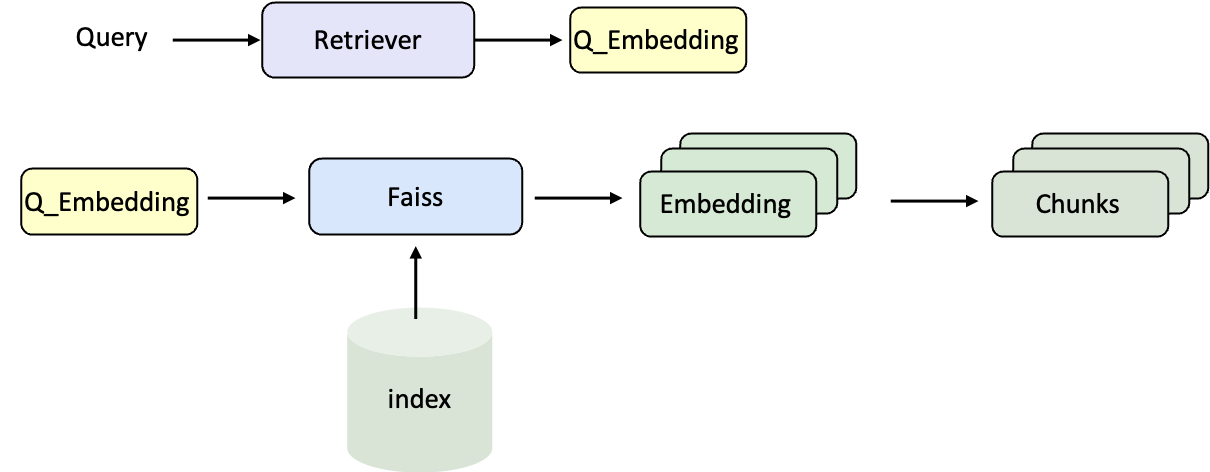
After the corpus index is ready, the next step is to combine the Retriever and the Large Language Model (LLM) to build a complete RAG Pipeline. In this way, questions can be retrieved to find relevant documents, and then handed over to the model to generate the final answer.
### Retrieval Process
### Example Corpus (Wiki Text)
```json data/corpus_example.jsonl icon="https://mintcdn.com/ultrarag/T7GffHzZitf6TThi/images/json.svg?fit=max&auto=format&n=T7GffHzZitf6TThi&q=85&s=81a8c440100333f3454ca984a5b0fe5a" theme={null}
{"id": "2066692", "contents": "Truman Sports Complex The Harry S. Truman Sports...."}
{"id": "15106858", "contents": "Arrowhead Stadium 1970s...."}
```
This is a typical Wiki corpus, where `id` is the unique identifier of the document, and `contents` is the actual text content. We will vectorize `contents` and build an index later.
### Write Encoding and Indexing Pipeline
```yaml examples/corpus_index.yaml icon="https://mintcdn.com/ultrarag/T7GffHzZitf6TThi/images/yaml.svg?fit=max&auto=format&n=T7GffHzZitf6TThi&q=85&s=69b41e79144bc908039c2ee3abbb1c3b" theme={null}
# MCP Server
servers:
retriever: servers/retriever
# MCP Client Pipeline
pipeline:
- retriever.retriever_init
- retriever.retriever_embed
- retriever.retriever_index
```
Here a minimal three-step process is defined: Initialization → Embedding → Indexing.
### Compile Pipeline File
```shell theme={null}
ultrarag build examples/corpus_index.yaml
```
### Modify Parameter File
```yaml examples/parameters/corpus_index_parameter.yaml icon="https://mintcdn.com/ultrarag/T7GffHzZitf6TThi/images/yaml.svg?fit=max&auto=format&n=T7GffHzZitf6TThi&q=85&s=69b41e79144bc908039c2ee3abbb1c3b" theme={null}
retriever:
backend: sentence_transformers
backend_configs:
bm25:
lang: en
save_path: index/bm25
infinity:
bettertransformer: false
model_warmup: false
pooling_method: auto
trust_remote_code: true
openai:
api_key: abc
base_url: https://api.openai.com/v1
model_name: text-embedding-3-small
sentence_transformers:
sentence_transformers_encode:
encode_chunk_size: 256
normalize_embeddings: false
psg_prompt_name: document
psg_task: null
q_prompt_name: query
q_task: null
trust_remote_code: true
batch_size: 16
collection_name: wiki
corpus_path: data/corpus_example.jsonl
embedding_path: embedding/embedding.npy
gpu_ids: '1'
index_backend: faiss
index_backend_configs:
faiss:
index_chunk_size: 10000
index_path: index/index.index
index_use_gpu: true
milvus:
id_field_name: id
id_max_length: 64
index_chunk_size: 1000
index_params:
index_type: AUTOINDEX
metric_type: IP
metric_type: IP
search_params:
metric_type: IP
params: {}
text_field_name: contents
text_max_length: 60000
token: null
uri: index/milvus_demo.db
vector_field_name: vector
is_demo: false
is_multimodal: false
model_name_or_path: openbmb/MiniCPM-Embedding-Light # [!code --]
model_name_or_path: Qwen/Qwen3-Embedding-0.6B # [!code ++]
overwrite: false
```
### Run Pipeline File
```shell theme={null}
ultrarag run examples/corpus_index.yaml
```
The encoding and indexing phase usually involves large-scale corpus processing and takes a long time. It is recommended to use `screen` or `nohup` to mount the task to run in the background, for example:
```shell theme={null}
nohup ultrarag run examples/corpus_index.yaml > log.txt 2>&1 &
```
After successful execution, you will get the corresponding corpus vector and index files, which can be directly used by the subsequent RAG Pipeline for retrieval.
## Build RAG Pipeline
After the corpus index is ready, the next step is to combine the Retriever and the Large Language Model (LLM) to build a complete RAG Pipeline. In this way, questions can be retrieved to find relevant documents, and then handed over to the model to generate the final answer.
### Retrieval Process
 ### Generation Process
### Data Format (Taking NQ Dataset as Example)
```json data/sample_nq_10.jsonl icon="https://mintcdn.com/ultrarag/T7GffHzZitf6TThi/images/json.svg?fit=max&auto=format&n=T7GffHzZitf6TThi&q=85&s=81a8c440100333f3454ca984a5b0fe5a" theme={null}
{"id": 0, "question": "when was the last time anyone was on the moon", "golden_answers": ["14 December 1972 UTC", "December 1972"], "meta_data": {}}
{"id": 1, "question": "who wrote he ain't heavy he's my brother lyrics", "golden_answers": ["Bobby Scott", "Bob Russell"], "meta_data": {}}
{"id": 2, "question": "how many seasons of the bastard executioner are there", "golden_answers": ["one", "one season"], "meta_data": {}}
{"id": 3, "question": "when did the eagles win last super bowl", "golden_answers": ["2017"], "meta_data": {}}
{"id": 4, "question": "who won last year's ncaa women's basketball", "golden_answers": ["South Carolina"], "meta_data": {}}
```
Each sample contains a question, standard answers (`golden_answers`), and additional information (`meta_data`), which will be used as input and evaluation benchmarks later.
### Write RAG Pipeline
```yaml examples/rag.yaml icon="https://mintcdn.com/ultrarag/T7GffHzZitf6TThi/images/yaml.svg?fit=max&auto=format&n=T7GffHzZitf6TThi&q=85&s=69b41e79144bc908039c2ee3abbb1c3b" theme={null}
# MCP Server
servers:
benchmark: servers/benchmark
retriever: servers/retriever
prompt: servers/prompt
generation: servers/generation
evaluation: servers/evaluation
custom: servers/custom
# MCP Client Pipeline
pipeline:
- benchmark.get_data
- retriever.retriever_init
- retriever.retriever_search
- generation.generation_init
- prompt.qa_rag_boxed
- generation.generate
- custom.output_extract_from_boxed
- evaluation.evaluate
```
The entire process completes sequentially:
1. Read data → 2. Initialize retriever and search → 3. Start LLM service → 4. Assemble Prompt → 5. Generate answer → 6. Extract result → 7. Evaluate performance.
### Compile Pipeline File
```shell theme={null}
ultrarag build examples/rag.yaml
```
### Modify Parameter File (Specify Dataset, Model, and Retrieval Configuration)
```yaml examples/parameters/rag_parameter.yaml icon="https://mintcdn.com/ultrarag/T7GffHzZitf6TThi/images/yaml.svg?fit=max&auto=format&n=T7GffHzZitf6TThi&q=85&s=69b41e79144bc908039c2ee3abbb1c3b" theme={null}
benchmark:
benchmark:
key_map:
gt_ls: golden_answers
q_ls: question
limit: -1
name: nq
path: data/sample_nq_10.jsonl
seed: 42
shuffle: false
custom: {}
evaluation:
metrics:
- acc
- f1
- em
- coverem
- stringem
- rouge-1
- rouge-2
- rouge-l
save_path: output/evaluate_results.json
generation:
backend: vllm
backend_configs:
hf:
batch_size: 8
gpu_ids: 2,3
model_name_or_path: openbmb/MiniCPM4-8B
trust_remote_code: true
openai:
api_key: abc
base_delay: 1.0
base_url: http://localhost:8000/v1
concurrency: 8
model_name: MiniCPM4-8B
retries: 3
vllm:
dtype: auto
gpu_ids: 2,3
gpu_memory_utilization: 0.9
model_name_or_path: openbmb/MiniCPM4-8B # [!code --]
model_name_or_path: Qwen/Qwen3-8B # [!code ++]
trust_remote_code: true
extra_params:
chat_template_kwargs:
enable_thinking: false
sampling_params:
max_tokens: 2048
temperature: 0.7
top_p: 0.8
system_prompt: ''
prompt:
template: prompt/qa_boxed.jinja # [!code --]
template: prompt/qa_rag_boxed.jinja # [!code ++]
retriever:
backend: sentence_transformers
backend_configs:
bm25:
lang: en
save_path: index/bm25
infinity:
bettertransformer: false
model_warmup: false
pooling_method: auto
trust_remote_code: true
openai:
api_key: abc
base_url: https://api.openai.com/v1
model_name: text-embedding-3-small
sentence_transformers:
sentence_transformers_encode:
encode_chunk_size: 256
normalize_embeddings: false
psg_prompt_name: document
psg_task: null
q_prompt_name: query
q_task: null
trust_remote_code: true
batch_size: 16
collection_name: wiki
corpus_path: data/corpus_example.jsonl
gpu_ids: '1'
index_backend: faiss
index_backend_configs:
faiss:
index_chunk_size: 10000
index_path: index/index.index
index_use_gpu: true
milvus:
id_field_name: id
id_max_length: 64
index_chunk_size: 1000
index_params:
index_type: AUTOINDEX
metric_type: IP
metric_type: IP
search_params:
metric_type: IP
params: {}
text_field_name: contents
text_max_length: 60000
token: null
uri: index/milvus_demo.db
vector_field_name: vector
is_demo: false
is_multimodal: false
model_name_or_path: openbmb/MiniCPM-Embedding-Light # [!code --]
model_name_or_path: Qwen/Qwen3-Embedding-0.6B # [!code ++]
query_instruction: ''
top_k: 5
```
### Run Pipeline File
```shell theme={null}
ultrarag run examples/rag.yaml
```
### View Generation Results
Use the visualization script to quickly browse model outputs.
```shell theme={null}
python ./script/case_study.py \
--data output/memory_nq_rag_full_20251010_145420.json \
--host 127.0.0.1 \
--port 8080 \
--title "Case Study Viewer"
```
### Generation Process
### Data Format (Taking NQ Dataset as Example)
```json data/sample_nq_10.jsonl icon="https://mintcdn.com/ultrarag/T7GffHzZitf6TThi/images/json.svg?fit=max&auto=format&n=T7GffHzZitf6TThi&q=85&s=81a8c440100333f3454ca984a5b0fe5a" theme={null}
{"id": 0, "question": "when was the last time anyone was on the moon", "golden_answers": ["14 December 1972 UTC", "December 1972"], "meta_data": {}}
{"id": 1, "question": "who wrote he ain't heavy he's my brother lyrics", "golden_answers": ["Bobby Scott", "Bob Russell"], "meta_data": {}}
{"id": 2, "question": "how many seasons of the bastard executioner are there", "golden_answers": ["one", "one season"], "meta_data": {}}
{"id": 3, "question": "when did the eagles win last super bowl", "golden_answers": ["2017"], "meta_data": {}}
{"id": 4, "question": "who won last year's ncaa women's basketball", "golden_answers": ["South Carolina"], "meta_data": {}}
```
Each sample contains a question, standard answers (`golden_answers`), and additional information (`meta_data`), which will be used as input and evaluation benchmarks later.
### Write RAG Pipeline
```yaml examples/rag.yaml icon="https://mintcdn.com/ultrarag/T7GffHzZitf6TThi/images/yaml.svg?fit=max&auto=format&n=T7GffHzZitf6TThi&q=85&s=69b41e79144bc908039c2ee3abbb1c3b" theme={null}
# MCP Server
servers:
benchmark: servers/benchmark
retriever: servers/retriever
prompt: servers/prompt
generation: servers/generation
evaluation: servers/evaluation
custom: servers/custom
# MCP Client Pipeline
pipeline:
- benchmark.get_data
- retriever.retriever_init
- retriever.retriever_search
- generation.generation_init
- prompt.qa_rag_boxed
- generation.generate
- custom.output_extract_from_boxed
- evaluation.evaluate
```
The entire process completes sequentially:
1. Read data → 2. Initialize retriever and search → 3. Start LLM service → 4. Assemble Prompt → 5. Generate answer → 6. Extract result → 7. Evaluate performance.
### Compile Pipeline File
```shell theme={null}
ultrarag build examples/rag.yaml
```
### Modify Parameter File (Specify Dataset, Model, and Retrieval Configuration)
```yaml examples/parameters/rag_parameter.yaml icon="https://mintcdn.com/ultrarag/T7GffHzZitf6TThi/images/yaml.svg?fit=max&auto=format&n=T7GffHzZitf6TThi&q=85&s=69b41e79144bc908039c2ee3abbb1c3b" theme={null}
benchmark:
benchmark:
key_map:
gt_ls: golden_answers
q_ls: question
limit: -1
name: nq
path: data/sample_nq_10.jsonl
seed: 42
shuffle: false
custom: {}
evaluation:
metrics:
- acc
- f1
- em
- coverem
- stringem
- rouge-1
- rouge-2
- rouge-l
save_path: output/evaluate_results.json
generation:
backend: vllm
backend_configs:
hf:
batch_size: 8
gpu_ids: 2,3
model_name_or_path: openbmb/MiniCPM4-8B
trust_remote_code: true
openai:
api_key: abc
base_delay: 1.0
base_url: http://localhost:8000/v1
concurrency: 8
model_name: MiniCPM4-8B
retries: 3
vllm:
dtype: auto
gpu_ids: 2,3
gpu_memory_utilization: 0.9
model_name_or_path: openbmb/MiniCPM4-8B # [!code --]
model_name_or_path: Qwen/Qwen3-8B # [!code ++]
trust_remote_code: true
extra_params:
chat_template_kwargs:
enable_thinking: false
sampling_params:
max_tokens: 2048
temperature: 0.7
top_p: 0.8
system_prompt: ''
prompt:
template: prompt/qa_boxed.jinja # [!code --]
template: prompt/qa_rag_boxed.jinja # [!code ++]
retriever:
backend: sentence_transformers
backend_configs:
bm25:
lang: en
save_path: index/bm25
infinity:
bettertransformer: false
model_warmup: false
pooling_method: auto
trust_remote_code: true
openai:
api_key: abc
base_url: https://api.openai.com/v1
model_name: text-embedding-3-small
sentence_transformers:
sentence_transformers_encode:
encode_chunk_size: 256
normalize_embeddings: false
psg_prompt_name: document
psg_task: null
q_prompt_name: query
q_task: null
trust_remote_code: true
batch_size: 16
collection_name: wiki
corpus_path: data/corpus_example.jsonl
gpu_ids: '1'
index_backend: faiss
index_backend_configs:
faiss:
index_chunk_size: 10000
index_path: index/index.index
index_use_gpu: true
milvus:
id_field_name: id
id_max_length: 64
index_chunk_size: 1000
index_params:
index_type: AUTOINDEX
metric_type: IP
metric_type: IP
search_params:
metric_type: IP
params: {}
text_field_name: contents
text_max_length: 60000
token: null
uri: index/milvus_demo.db
vector_field_name: vector
is_demo: false
is_multimodal: false
model_name_or_path: openbmb/MiniCPM-Embedding-Light # [!code --]
model_name_or_path: Qwen/Qwen3-Embedding-0.6B # [!code ++]
query_instruction: ''
top_k: 5
```
### Run Pipeline File
```shell theme={null}
ultrarag run examples/rag.yaml
```
### View Generation Results
Use the visualization script to quickly browse model outputs.
```shell theme={null}
python ./script/case_study.py \
--data output/memory_nq_rag_full_20251010_145420.json \
--host 127.0.0.1 \
--port 8080 \
--title "Case Study Viewer"
```