1. Pipeline 结构概览
 examples/RAG.yaml
# RAG Demo for UltraRAG UI
# MCP Server
servers:
benchmark: servers/benchmark
retriever: servers/retriever
prompt: servers/prompt
generation: servers/generation
evaluation: servers/evaluation
custom: servers/custom
# MCP Client Pipeline
pipeline:
- benchmark.get_data
- retriever.retriever_init
- generation.generation_init
- retriever.retriever_search
- custom.assign_citation_ids
- prompt.qa_rag_boxed
- generation.generate
2. 编译Pipeline文件
在终端执行以下命令进行编译:ultrarag build examples/RAG.yaml
3. 配置运行参数
修改examples/parameter/RAG_parameter.yaml。在 RAG 场景中,除了配置 LLM 生成后端外,还需要重点配置 Embedding 检索后端。
examples/parameter/RAG_parameter.yamlbenchmark:
benchmark:
key_map:
gt_ls: golden_answers
q_ls: question
limit: -1
name: nq
path: data/sample_nq_10.jsonl
seed: 42
shuffle: false
generation:
backend: vllm
backend: openai
backend_configs:
hf:
batch_size: 8
gpu_ids: 2,3
model_name_or_path: openbmb/MiniCPM4-8B
trust_remote_code: true
openai:
api_key: abc
base_delay: 1.0
base_url: http://localhost:8000/v1
base_url: http://localhost:65503/v1
concurrency: 8
model_name: MiniCPM4-8B
model_name: qwen3-32b
retries: 3
vllm:
dtype: auto
gpu_ids: 2,3
gpu_memory_utilization: 0.9
model_name_or_path: openbmb/MiniCPM4-8B
trust_remote_code: true
extra_params:
chat_template_kwargs:
enable_thinking: false
sampling_params:
max_tokens: 2048
temperature: 0.7
top_p: 0.8
system_prompt: ''
system_prompt: '你是一个专业的UltraRAG问答助手。请一定记住使用中文回答问题。'
prompt:
template: prompt/qa_boxed.jinja
template: prompt/qa_rag_citation.jinja
retriever:
backend: sentence_transformers
backend: openai
backend_configs:
bm25:
lang: en
save_path: index/bm25
infinity:
bettertransformer: false
model_warmup: false
pooling_method: auto
trust_remote_code: true
openai:
api_key: abc
base_url: https://api.openai.com/v1
base_url: http://localhost:65504/v1
model_name: text-embedding-3-small
model_name: qwen-embedding
sentence_transformers:
sentence_transformers_encode:
encode_chunk_size: 256
normalize_embeddings: false
psg_prompt_name: document
psg_task: null
q_prompt_name: query
q_task: null
trust_remote_code: true
batch_size: 16
collection_name: wiki
corpus_path: data/corpus_example.jsonl
gpu_ids: '1'
index_backend: faiss
index_backend_configs:
faiss:
index_chunk_size: 10000
index_path: index/index.index
index_use_gpu: true
milvus:
id_field_name: id
id_max_length: 64
index_chunk_size: 1000
index_params:
index_type: AUTOINDEX
metric_type: IP
metric_type: IP
search_params:
metric_type: IP
params: {}
text_field_name: contents
text_max_length: 60000
token: null
uri: index/milvus_demo.db
vector_field_name: vector
is_demo: false
is_multimodal: false
model_name_or_path: openbmb/MiniCPM-Embedding-Light
query_instruction: ''
query_instruction: 'Query: '
top_k: 5
top_k: 20
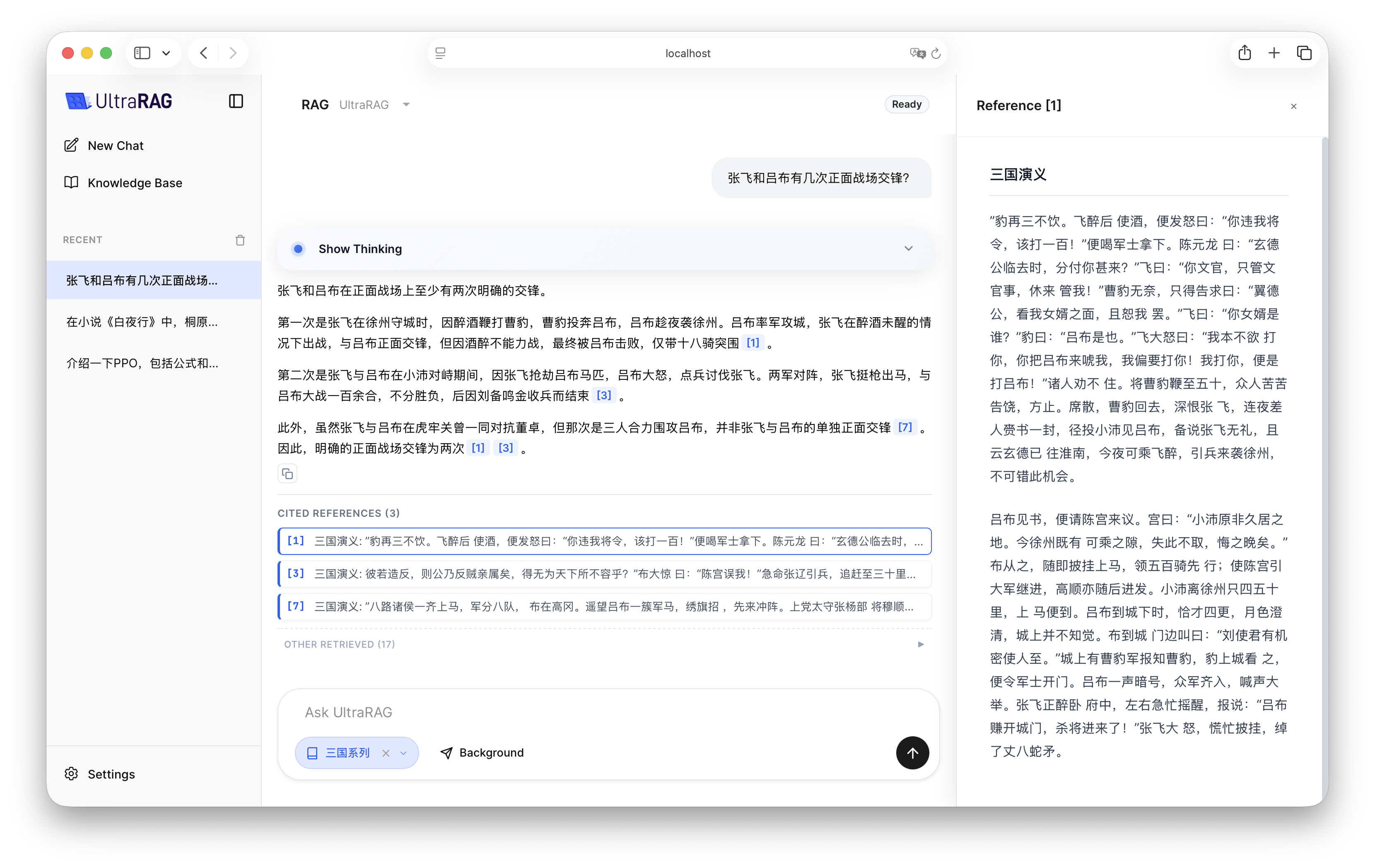
4. 效果演示
配置完成后,启动 UltraRAG UI,在界面中选择 RAG Pipeline,并选取对应的知识库。您将看到 LLM 如何结合检索到的文档片段给出更精准、带引用的回答。