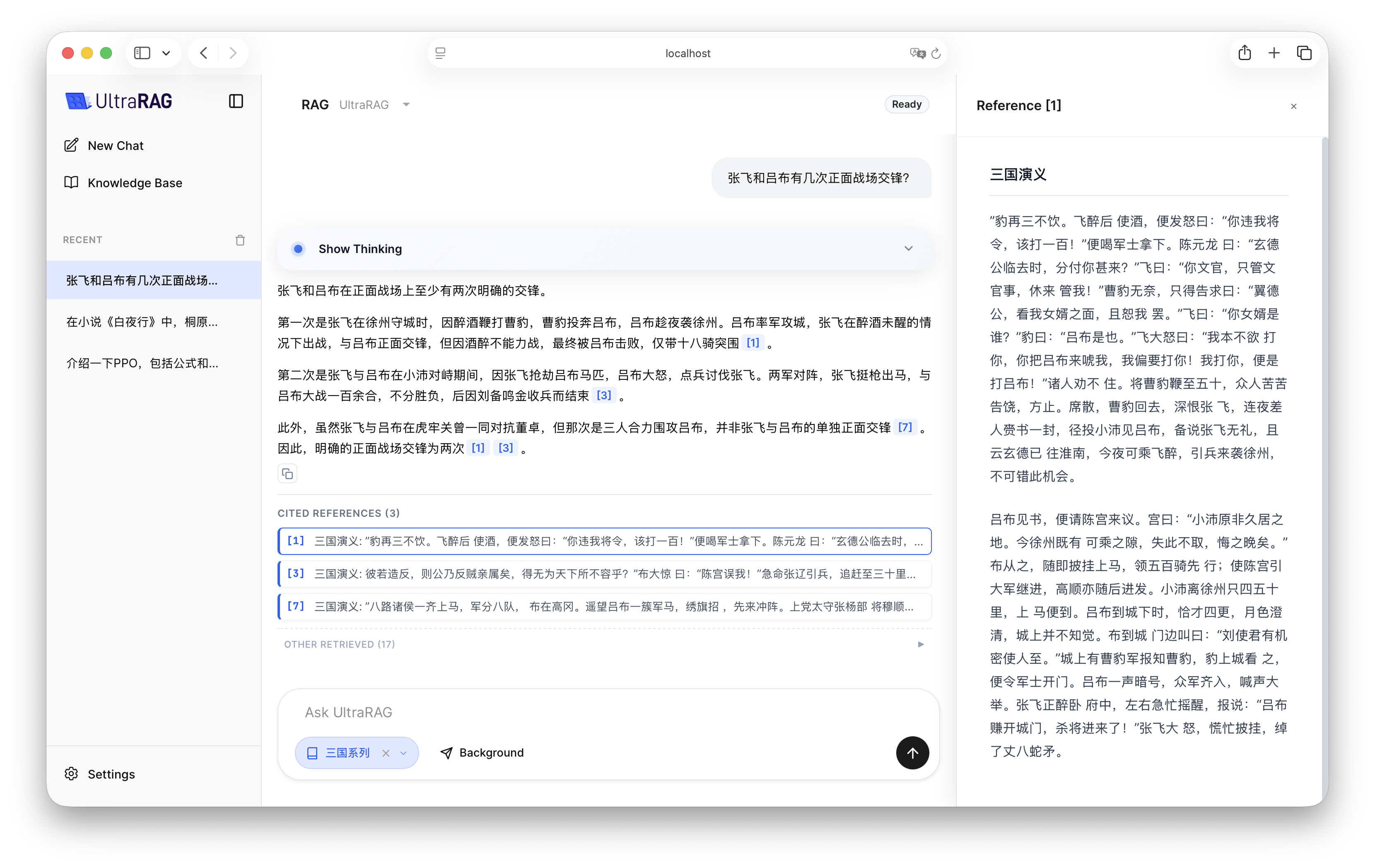
To deeply experience Retrieval-Augmented Generation (RAG) capabilities in UltraRAG UI, we provide a standardized RAG Pipeline. This process integrates the complete link of document retrieval, citation annotation, and augmented generation.

1. Pipeline Structure Overview

https://mintcdn.com/ultrarag/T7GffHzZitf6TThi/images/yaml.svg?fit=max&auto=format&n=T7GffHzZitf6TThi&q=85&s=69b41e79144bc908039c2ee3abbb1c3bexamples/RAG.yaml
# RAG Demo for UltraRAG UI

# MCP Server
servers:
  benchmark: servers/benchmark
  retriever: servers/retriever
  prompt: servers/prompt
  generation: servers/generation
  evaluation: servers/evaluation
  custom: servers/custom

# MCP Client Pipeline
pipeline:
- benchmark.get_data
- retriever.retriever_init
- generation.generation_init
- retriever.retriever_search
- custom.assign_citation_ids
- prompt.qa_rag_boxed
- generation.generate

2. Compile Pipeline File

Execute the following command in the terminal to compile:
ultrarag build examples/RAG.yaml

3. Configure Running Parameters

Modify examples/parameter/RAG_parameter.yaml. In RAG scenarios, in addition to configuring the LLM generation backend, you also need to focus on configuring the Embedding retrieval backend.
https://mintcdn.com/ultrarag/T7GffHzZitf6TThi/images/yaml.svg?fit=max&auto=format&n=T7GffHzZitf6TThi&q=85&s=69b41e79144bc908039c2ee3abbb1c3bexamples/parameter/RAG_parameter.yaml
benchmark:
  benchmark:
    key_map:
      gt_ls: golden_answers
      q_ls: question
    limit: -1
    name: nq
    path: data/sample_nq_10.jsonl
    seed: 42
    shuffle: false
generation:
  backend: vllm
  backend: openai
  backend_configs:
    hf:
      batch_size: 8
      gpu_ids: 2,3
      model_name_or_path: openbmb/MiniCPM4-8B
      trust_remote_code: true
    openai:
      api_key: abc
      base_delay: 1.0
      base_url: http://localhost:8000/v1
      base_url: http://localhost:65503/v1
      concurrency: 8
      model_name: MiniCPM4-8B
      model_name: qwen3-32b
      retries: 3
    vllm:
      dtype: auto
      gpu_ids: 2,3
      gpu_memory_utilization: 0.9
      model_name_or_path: openbmb/MiniCPM4-8B
      trust_remote_code: true
  extra_params:
    chat_template_kwargs:
      enable_thinking: false
  sampling_params:
    max_tokens: 2048
    temperature: 0.7
    top_p: 0.8
  system_prompt: ''
  system_prompt: 'You are a professional UltraRAG Q&A assistant.'
prompt:
  template: prompt/qa_boxed.jinja
  template: prompt/qa_rag_citation.jinja
retriever: 
  backend: sentence_transformers
  backend: openai
  backend_configs:
    bm25:
      lang: en
      save_path: index/bm25
    infinity:
      bettertransformer: false
      model_warmup: false
      pooling_method: auto
      trust_remote_code: true
    openai:
      api_key: abc
      base_url: https://api.openai.com/v1
      base_url: http://localhost:65504/v1
      model_name: text-embedding-3-small
      model_name: qwen-embedding
    sentence_transformers:
      sentence_transformers_encode:
        encode_chunk_size: 256
        normalize_embeddings: false
        psg_prompt_name: document
        psg_task: null
        q_prompt_name: query
        q_task: null
      trust_remote_code: true
  batch_size: 16
  collection_name: wiki
  corpus_path: data/corpus_example.jsonl
  gpu_ids: '1'
  index_backend: faiss
  index_backend_configs:
    faiss:
      index_chunk_size: 10000
      index_path: index/index.index
      index_use_gpu: true
    milvus:
      id_field_name: id
      id_max_length: 64
      index_chunk_size: 1000
      index_params:
        index_type: AUTOINDEX
        metric_type: IP
      metric_type: IP
      search_params:
        metric_type: IP
        params: {}
      text_field_name: contents
      text_max_length: 60000
      token: null
      uri: index/milvus_demo.db
      vector_field_name: vector
  is_demo: false
  is_multimodal: false
  model_name_or_path: openbmb/MiniCPM-Embedding-Light
  query_instruction: ''
  query_instruction: 'Query: '
  top_k: 5
  top_k: 20

4. Effect Demonstration

After configuration is complete, start UltraRAG UI, select RAG Pipeline in the interface, and select the corresponding knowledge base. You will see how the LLM combines retrieved document fragments to give more accurate and cited answers.